Build n8n AI Agents: AI Workflow Automations


Alex Tarlescu

Alex Tarlescu

Build n8n AI Agents: AI Workflow Automations

Quick Summary

Go beyond basic n8n automation. Discover how to build multi-step n8n AI agents, leverage any LLM, and write custom code within your n8n ai workflow. Automate practically anything.

Build n8n AI Agents: AI Workflow Automations

What is an n8n AI Agent? Understanding AI-Powered Workflow Automation

n8n workflow automation platform logo

Definition and Core Concepts of n8n AI Agents

According to n8n’s official documentation, an n8n AI agent is an autonomous system that receives data, makes rational decisions, and acts within its environment to achieve specific goals. The AI agent’s environment is everything the agent can access that isn’t the agent itself. This agent uses external tools and APIs to perform actions and retrieve information.
n8n built-in app nodes and integrations documentation page

Unlike static automation tools, n8n AI agents combine the power of Large Language Models (LLMs) with n8n’s visual workflow automation platform to create intelligent, decision-making workflows that can understand context, adapt to new situations, and autonomously achieve complex goals.

The n8n platform overhauls how developers approach workflow automation by providing smooth integration capabilities that extend far beyond traditional tools. Unlike basic automation solutions, n8n makes it possible to connect diverse data sources including GitHub repositories, Google Sheets, and Airtable databases through a sophisticated HTTP request node system. The platform’s open-source LLMs and advanced prompt engineering capabilities enable users to customize their workflows dynamically, ensuring that complex tasks can be automated without requiring extensive coding knowledge. Essential tools like Ollama and various LLM apps integrate effortlessly, allowing teams to build full AI workflows with n8n that adapt to changing business requirements.

*** You can find n8n AI Agent examples that you can use at the bottom of the article!

n8n AI Agent vs Traditional Automation: Key Differences

The fundamental distinction between n8n AI agents and traditional automation lies in their decision-making capabilities:

Traditional Automation:

    • Follows predetermined “if-this-then-that” rules

    • Requires explicit programming for every scenario

    • Cannot handle unexpected inputs gracefully

    • Limited to structured data processing

    • Static workflow paths with no adaptation

n8n AI Agents:

    • Use LLMs for reasoning and contextual decision-making

    • Adapt to new scenarios without reprogramming

    • Process natural language and unstructured data

    • Learn from context and previous interactions

    • Dynamic workflow execution based on real-time analysis

The Role of LLMs in n8n AI Agent Architecture

Large Language Models serve as the “reasoning engine” behind n8n AI agents. As detailed in n8n’s AI agents implementation guide, the reasoning engine operates through a combination of perception, reasoning, and action execution.

The n8n platform supports multiple LLM providers including:

    • OpenAI (GPT-4, GPT-4 Turbo, GPT-4o-mini)

    • Google (Gemini Pro, Gemini 2.5)

    • Anthropic (Claude 3.5 Sonnet, Claude Opus)

    • Open Source Models (DeepSeek, Groq, Llama)

n8n AI Agent vs ChatGPT: Capabilities and Use Cases

While ChatGPT excels at conversational AI and content generation, n8n AI agents are designed for workflow automation and business process integration:

ChatGPT:

    • Conversational interface focused

    • Limited external tool integration

    • Requires human input at each step

    • General-purpose text generation

n8n AI Agent:

    • Workflow automation focused

    • Deep integration with 400+ applications

    • Autonomous operation with minimal supervision

    • Business process optimization and task execution

Why Choose n8n AI Agent for Business Automation

Industry research shows that 51% of companies are already using AI agents in production. n8n AI agents offer unique advantages:

Cost Efficiency: Self-hosted options provide unlimited executions Integration Depth: Native connections to hundreds of business applications Visual Development: Low-code interface reduces development time Open Source Foundation: Community-driven improvements and transparency

The Evolution from Rule-Based to Intelligent Workflow Automation

The automation world has evolved through three distinct phases:

    1. Basic Task Automation: Simple trigger-action workflows

    1. Complex Business Process Automation: Multi-step, conditional workflows

    1. Intelligent Agentic Automation: AI-driven decision-making and adaptation

n8n AI agents represent the third phase, enabling really intelligent automation that can understand context, make decisions, and adapt to changing conditions.

n8n AI Agent Fundamentals: Core Technology and Benefits

Understanding n8n AI Agent Technology Stack

The n8n AI agent technology stack consists of several integrated layers:

1. LangChain Integration Layer: n8n takes it a step further by providing a low-code interface to LangChain. In n8n, you can simply drag and drop LangChain nodes onto the canvas and configure them.

2. AI Agent Orchestration: The Tools Agent uses external tools and APIs to perform actions and retrieve information. It can understand the capabilities of different tools and determine which tool to use depending on the task.

3. Memory Management System: Persistent conversation context and state management 4. Visual Workflow Designer: Drag-and-drop interface for complex agent workflows 5. Integration Framework: Native connectors to 400+ applications and services

Business Benefits of Implementing n8n AI Agents

Based on full industry analysis, companies implementing AI agents achieve:

    • Faster Information Analysis: Automated processing of large datasets and document extraction

    • Increased Team Productivity: 40-60% reduction in routine task completion time

    • Enhanced Customer Experience: 24/7 support capabilities with improved response times

    • Accelerated Development: AI-assisted coding, debugging, and documentation generation

    • Improved Data Quality: Automated validation and error detection reducing manual mistakes

n8n AI Agent Pricing and ROI Considerations

Pricing Models:

    • n8n Cloud: Subscription-based with usage tiers

    • Self-Hosted: One-time setup with unlimited executions

    • Enterprise: Custom pricing with advanced features and support

ROI Calculation Framework:

    • Labor cost savings from automated tasks

    • Reduced error rates and rework costs

    • Faster time-to-market for new processes

    • Scalability benefits compared to manual operations

Technical Architecture of n8n AI Agents

Core Components of n8n AI Agent Architecture

Data Processing Pipeline and Workflow Integration

The n8n AI agent architecture operates through a sophisticated data processing pipeline:

    1. Input Processing: Data ingestion from triggers, webhooks, and scheduled events

    1. Context Analysis: LLM-powered understanding of request intent and requirements

    1. Tool Selection: Intelligent choice of appropriate tools based on task requirements

    1. Execution Planning: Multi-step workflow generation and optimization

    1. Result Processing: Output formatting and response generation

API Connections and Interaction Methods

n8n AI agents connect to external systems through multiple methods:

    • REST API integrations for web services

    • Database connections for data operations

    • Webhook endpoints for real-time event processing

    • File system access for document processing

    • Message queue integration for asynchronous operations

LangChain Integration with n8n AI Agent Systems

ReAct AI Pattern Implementation

The ReAct (Reasoning and Acting) pattern enables agents to:

    • Reason about problems and plan solutions

    • Act by executing tools and gathering information

    • Observe results and adjust strategies accordingly

This pattern is implemented through specialized prompt templates and tool calling interfaces within the n8n environment.

Understanding the n8n AI Agent Reasoning Engine

The reasoning engine operates through three core phases:

1. Perception: Unlike simple chatbots, AI agents use multi-step prompting techniques to make decisions. Through chains of specialized prompts (reasoning, tool selection), agents can handle complex scenarios that are not possible with single-shot responses.

2. Decision-Making: The LLM analyzes input context, evaluates available tools, and develops execution plans based on configured system prompts and historical interactions.

3. Action Execution: Agents execute planned actions using connected tools and APIs, then process results to determine next steps or provide final responses.

n8n AI Agent Node Types and Capabilities

The Tools Agent implementation serves as the primary recommended approach for most use cases.

Core Functionality:

    • Enhanced ability to work with tools and ensure standard output format

    • Implements LangChain’s tool calling interface for describing available tools and schemas

    • Improved output parsing capabilities through formatting tool integration

Configuration Best Practices:

    • Connect at least one tool sub-node to the AI Agent node

    • Configure clear tool descriptions for optimal selection

    • Set appropriate system messages for agent behavior guidance

Conversational Agent: For Models Without Native Tool Calling

When to Use:

    • Legacy LLM models without function calling capabilities

    • Simple conversational interfaces without external tool requirements

    • Testing and development scenarios with limited integration needs

Setup Considerations:

    • Limited to text-based interactions

    • Requires manual result processing for complex outputs

    • Best suited for content generation and analysis tasks

OpenAI Functions Agent: For OpenAI Function Models

Function Calling Capabilities:

    • Native integration with OpenAI’s function calling API

    • Structured output generation for reliable tool integration

    • Advanced parameter validation and error handling

Performance Optimization:

    • Reduced token usage through efficient function descriptions

    • Faster execution through optimized API calls

    • Better reliability through structured output validation

Plan and Execute Agent: For Complex Multi-Step Tasks

Task Planning Features:

    • Automatic breakdown of complex requests into manageable steps

    • Dynamic execution planning based on intermediate results

    • Progress tracking and milestone validation

Use Case Applications:

    • Multi-stage data processing workflows

    • Complex business process automation

    • Project management and task coordination

SQL Agent: For Database Interactions

Natural Language to SQL Translation: Instead of overloading the LLM context window with raw data, our agent will use SQL to efficiently query the database – just like human analysts do.

Implementation Example:

User Query: "What are our top-selling products this quarter by region?"
Agent Process: 
- Interprets intent and identifies required data tables
- Generates optimized SQL query with proper joins and filters  
- Executes query on connected database with security controls
- Formats results with regional breakdown and insights
- Suggests follow-up analysis opportunities

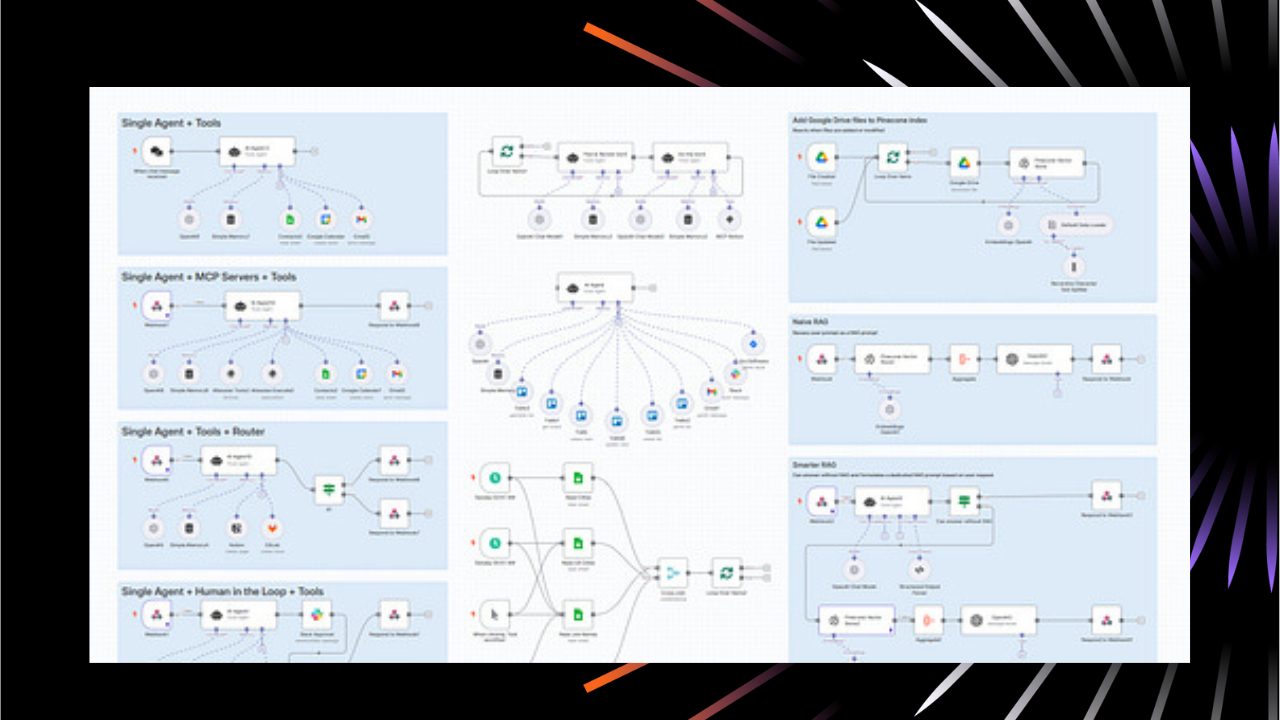
Types of n8n AI Agents: 8 Essential Architectures

Recent full analysis from ProductCompass’s AI Agent Architecture guide identifies eight essential agent configurations for production implementations.

Five Single n8n AI Agent Architectures

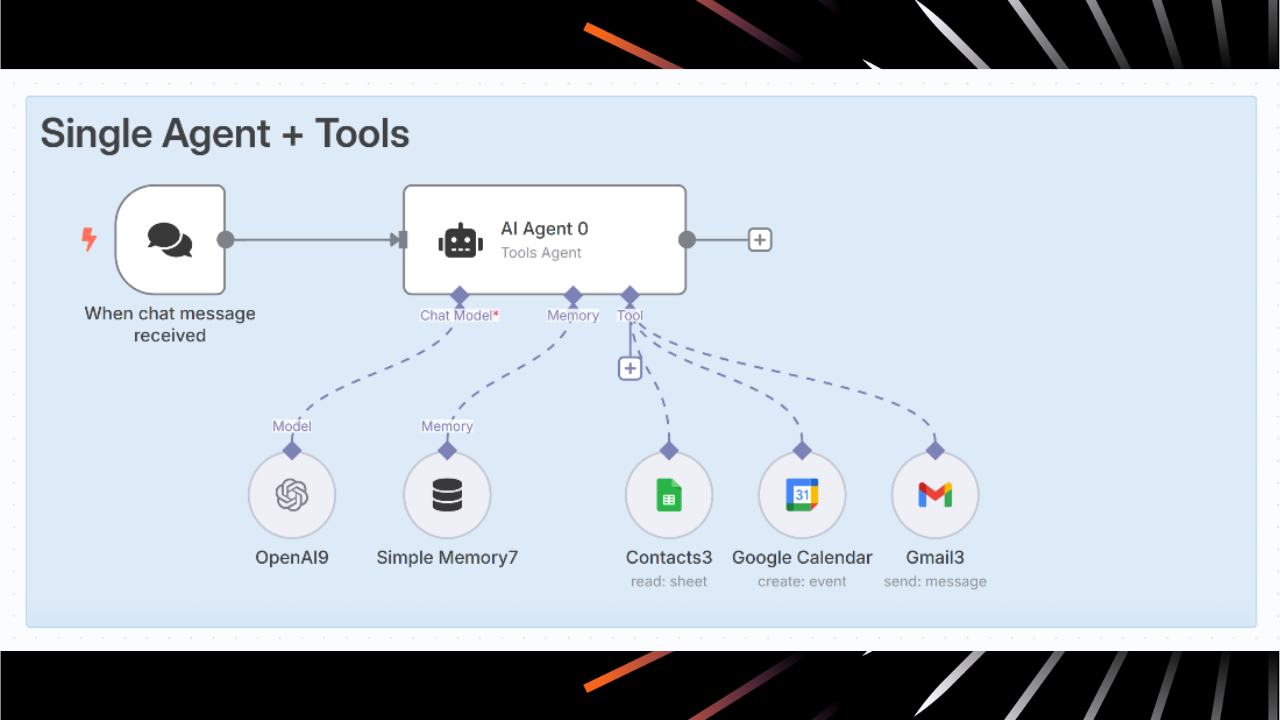
Tool-Based AI Agent (Multi-Tool Chat Orchestration)

This foundational architecture enables an AI agent to access multiple tools based on chat messages. The agent can:

    • Access contact databases and customer information

    • Send emails and calendar invitations

    • Manage scheduling and event coordination

    • Perform web searches and data lookups

    • Execute complex business logic through tool combinations

Implementation Pattern:

Chat Trigger → AI Agent Node → Multiple Tool Nodes (Gmail, Contacts, Calendar, SerpAPI)

Best Use Cases: Personal assistants, customer service automation, administrative task coordination

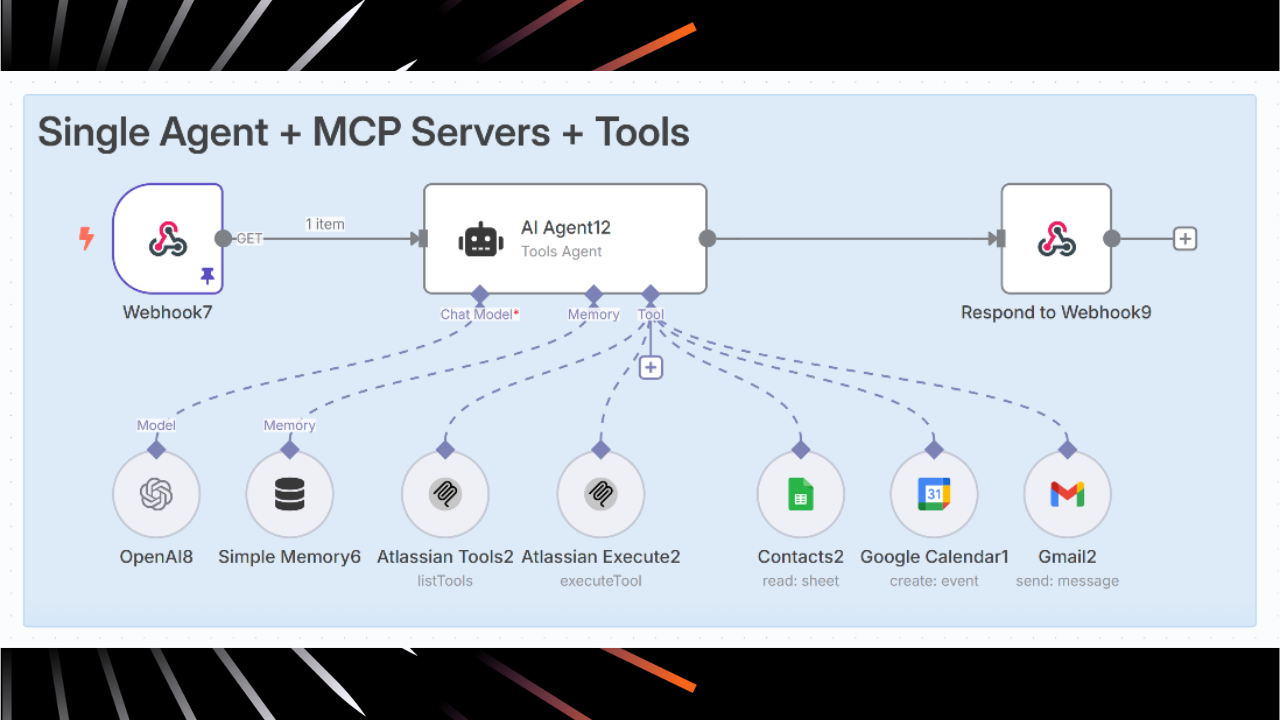
MCP Server Integration Agent (Enterprise Webhook-Triggered)

This advanced architecture combines Model Context Protocol (MCP) servers with traditional tools for enterprise environments:

Key Components:

    • MCP servers for deep enterprise integrations (Atlassian, Jira, Confluence)

    • Webhook triggers for external application initialization

    • Traditional tools for standard operations

    • Event-driven activation from multiple system sources

Enterprise Benefits:

    • Deep integration with existing enterprise software stacks

    • Scalable architecture supporting large organizational workflows

    • Event-driven operation reducing manual intervention requirements

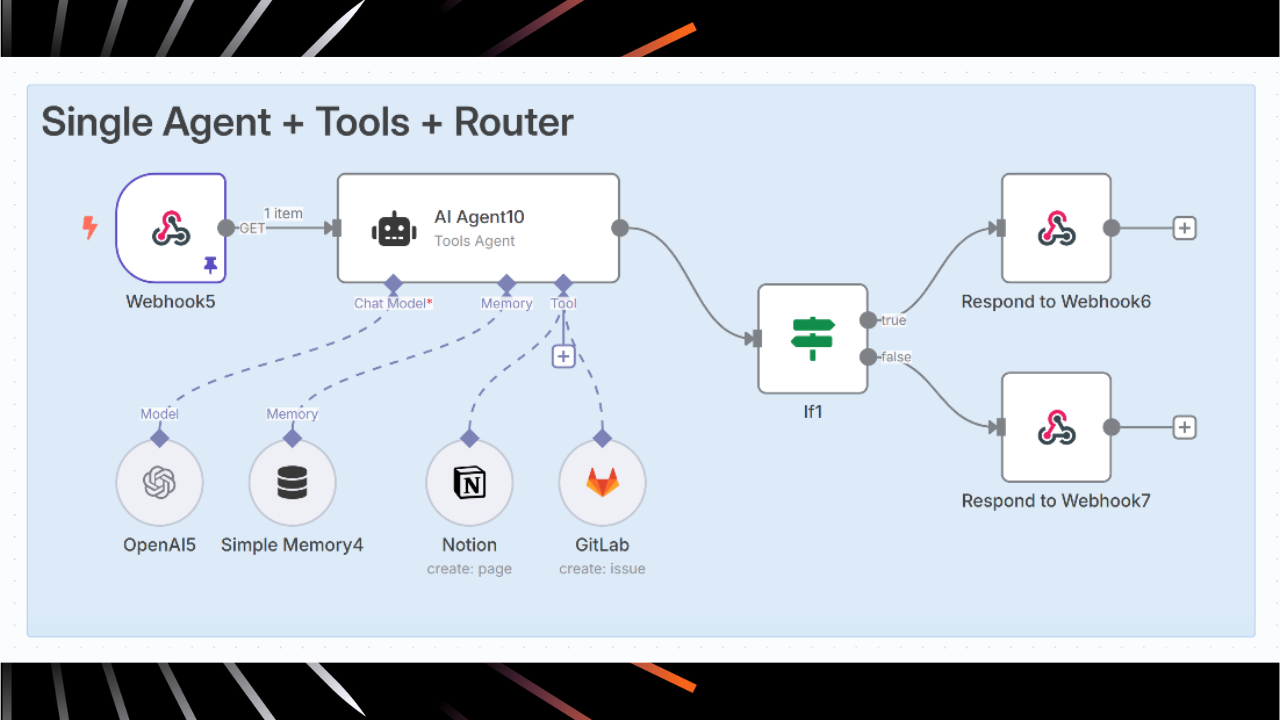
Router-Based Agentic Workflow (Conditional Logic Agent)

This pattern uses intelligent routing to direct different types of requests to specialized processing paths:

Architecture Components:

    1. Classification Agent: AI-powered request categorization and complexity assessment

    1. Routing Logic: Intelligent direction to appropriate sub-workflows

    1. Specialized Handlers: Optimized agent configurations for specific scenarios

    1. Result Aggregation: Unified output formatting and response coordination

Implementation Benefits:

    • Improved efficiency through specialized processing

    • Better resource utilization and cost optimization

    • Enhanced maintainability through modular design

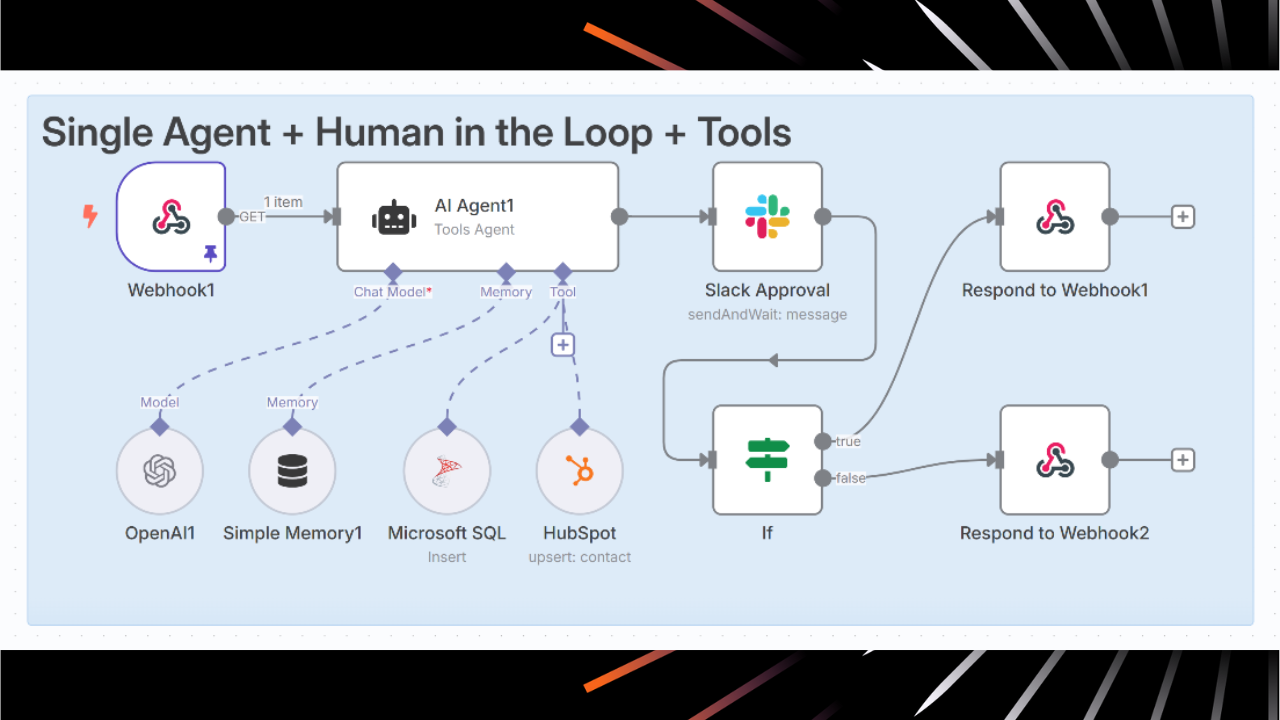
Human-in-the-Loop AI Agent (Approval-Based Workflow)

Critical for sensitive operations requiring human oversight:

    • File system access for document processing

    • Message queue integration for asynchronous operations

LangChain Integration with n8n AI Agent Systems

ReAct AI Pattern Implementation

The ReAct (Reasoning and Acting) pattern enables agents to:

    • Reason about problems and plan solutions

    • Act by executing tools and gathering information

    • Observe results and adjust strategies accordingly

This pattern is implemented through specialized prompt templates and tool calling interfaces within the n8n environment.

Understanding the n8n AI Agent Reasoning Engine

The reasoning engine operates through three core phases:

1. Perception: Unlike simple chatbots, AI agents use multi-step prompting techniques to make decisions. Through chains of specialized prompts (reasoning, tool selection), agents can handle complex scenarios that are not possible with single-shot responses.

2. Decision-Making: The LLM analyzes input context, evaluates available tools, and develops execution plans based on configured system prompts and historical interactions.

3. Action Execution: Agents execute planned actions using connected tools and APIs, then process results to determine next steps or provide final responses.

n8n AI Agent Node Types and Capabilities

The Tools Agent implementation serves as the primary recommended approach for most use cases.

Core Functionality:

    • Enhanced ability to work with tools and ensure standard output format

    • Implements LangChain’s tool calling interface for describing available tools and schemas

    • Improved output parsing capabilities through formatting tool integration

Configuration Best Practices:

    • Connect at least one tool sub-node to the AI Agent node

    • Configure clear tool descriptions for optimal selection

    • Set appropriate system messages for agent behavior guidance

Conversational Agent: For Models Without Native Tool Calling

When to Use:

    • Legacy LLM models without function calling capabilities

    • Simple conversational interfaces without external tool requirements

    • Testing and development scenarios with limited integration needs

Setup Considerations:

    • Limited to text-based interactions

    • Requires manual result processing for complex outputs

    • Best suited for content generation and analysis tasks

OpenAI Functions Agent: For OpenAI Function Models

Function Calling Capabilities:

    • Native integration with OpenAI’s function calling API

    • Structured output generation for reliable tool integration

    • Advanced parameter validation and error handling

Performance Optimization:

    • Reduced token usage through efficient function descriptions

    • Faster execution through optimized API calls

    • Better reliability through structured output validation

Plan and Execute Agent: For Complex Multi-Step Tasks

Task Planning Features:

    • Automatic breakdown of complex requests into manageable steps

    • Dynamic execution planning based on intermediate results

    • Progress tracking and milestone validation

Use Case Applications:

    • Multi-stage data processing workflows

    • Complex business process automation

    • Project management and task coordination

SQL Agent: For Database Interactions

Natural Language to SQL Translation: Instead of overloading the LLM context window with raw data, our agent will use SQL to efficiently query the database – just like human analysts do.

Implementation Example:

User Query: "What are our top-selling products this quarter by region?"
Agent Process: 
- Interprets intent and identifies required data tables
- Generates optimized SQL query with proper joins and filters  
- Executes query on connected database with security controls
- Formats results with regional breakdown and insights
- Suggests follow-up analysis opportunities

Types of n8n AI Agents: 8 Essential Architectures

Recent comprehensive analysis from ProductCompass’s AI Agent Architecture guide identifies eight essential agent configurations for production implementations.

Five Single n8n AI Agent Architectures

Tool-Based AI Agent (Multi-Tool Chat Orchestration)

This foundational architecture enables an AI agent to access multiple tools based on chat messages. The agent can:

    • Access contact databases and customer information

    • Send emails and calendar invitations

    • Manage scheduling and event coordination

    • Perform web searches and data lookups

    • Execute complex business logic through tool combinations

Implementation Pattern:

Chat Trigger → AI Agent Node → Multiple Tool Nodes (Gmail, Contacts, Calendar, SerpAPI)

Best Use Cases: Personal assistants, customer service automation, administrative task coordination

MCP Server Integration Agent (Enterprise Webhook-Triggered)

This advanced architecture combines Model Context Protocol (MCP) servers with traditional tools for enterprise environments:

Key Components:

      1. Automated Processing: AI handles standard operations up to decision points

      1. Human Approval Request: Automated notifications via Slack, email, or custom interfaces

      1. Conditional Execution: Workflow continues based on approval response

      1. Audit Trail Generation: Full logging for compliance and accountability

    Use Cases: Financial transactions, sensitive data operations, high-stakes communications, regulatory compliance workflows

    Dynamic Agent Calling System (Autonomous AI Coordination)

    The most sophisticated single-agent architecture enabling autonomous multi-agent coordination:

    Core Capabilities:

      • Task Complexity Assessment: Intelligent evaluation of resource requirements

      • Autonomous Agent Invocation: Dynamic calling of specialist agents when needed

      • Inter-Agent Communication: Coordinated information sharing and task delegation

      • Resource Optimization: Intelligent workload distribution and cost management

    Three Multiple n8n AI Agent Architectures

    Sequential AI Agent Processing (Contact → Email Chain)

      • File system access for document processing

      • Message queue integration for asynchronous operations

    LangChain Integration with n8n AI Agent Systems

    ReAct AI Pattern Implementation

    The ReAct (Reasoning and Acting) pattern enables agents to:

      • Reason about problems and plan solutions

      • Act by executing tools and gathering information

      • Observe results and adjust strategies accordingly

    This pattern is implemented through specialized prompt templates and tool calling interfaces within the n8n environment.

    Understanding the n8n AI Agent Reasoning Engine

    The reasoning engine operates through three core phases:

    1. Perception: Unlike simple chatbots, AI agents use multi-step prompting techniques to make decisions. Through chains of specialized prompts (reasoning, tool selection), agents can handle complex scenarios that are not possible with single-shot responses.

    2. Decision-Making: The LLM analyzes input context, evaluates available tools, and develops execution plans based on configured system prompts and historical interactions.

    3. Action Execution: Agents execute planned actions using connected tools and APIs, then process results to determine next steps or provide final responses.

    n8n AI Agent Node Types and Capabilities

    The Tools Agent implementation serves as the primary recommended approach for most use cases.

    Core Functionality:

      • Enhanced ability to work with tools and ensure standard output format

      • Implements LangChain’s tool calling interface for describing available tools and schemas

      • Improved output parsing capabilities through formatting tool integration

    Configuration Best Practices:

      • Connect at least one tool sub-node to the AI Agent node

      • Configure clear tool descriptions for optimal selection

      • Set appropriate system messages for agent behavior guidance

    Conversational Agent: For Models Without Native Tool Calling

    When to Use:

      • Legacy LLM models without function calling capabilities

      • Simple conversational interfaces without external tool requirements

      • Testing and development scenarios with limited integration needs

    Setup Considerations:

      • Limited to text-based interactions

      • Requires manual result processing for complex outputs

      • Best suited for content generation and analysis tasks

    OpenAI Functions Agent: For OpenAI Function Models

    Function Calling Capabilities:

      • Native integration with OpenAI’s function calling API

      • Structured output generation for reliable tool integration

      • Advanced parameter validation and error handling

    Performance Optimization:

      • Reduced token usage through efficient function descriptions

      • Faster execution through optimized API calls

      • Better reliability through structured output validation

    Plan and Execute Agent: For Complex Multi-Step Tasks

    Task Planning Features:

      • Automatic breakdown of complex requests into manageable steps

      • Dynamic execution planning based on intermediate results

      • Progress tracking and milestone validation

    Use Case Applications:

      • Multi-stage data processing workflows

      • Complex business process automation

      • Project management and task coordination

    SQL Agent: For Database Interactions

    Natural Language to SQL Translation: Instead of overloading the LLM context window with raw data, our agent will use SQL to efficiently query the database – just like human analysts do.

    Implementation Example:

    User Query: "What are our top-selling products this quarter by region?"
    Agent Process: 
    - Interprets intent and identifies required data tables
    - Generates optimized SQL query with proper joins and filters  
    - Executes query on connected database with security controls
    - Formats results with regional breakdown and insights
    - Suggests follow-up analysis opportunities

    Types of n8n AI Agents: 8 Essential Architectures

    Recent comprehensive analysis from ProductCompass’s AI Agent Architecture guide identifies eight essential agent configurations for production implementations.

    Five Single n8n AI Agent Architectures

    Tool-Based AI Agent (Multi-Tool Chat Orchestration)

    This foundational architecture enables an AI agent to access multiple tools based on chat messages. The agent can:

      • Access contact databases and customer information

      • Send emails and calendar invitations

      • Manage scheduling and event coordination

      • Perform web searches and data lookups

      • Execute complex business logic through tool combinations

    Implementation Pattern:

    Chat Trigger → AI Agent Node → Multiple Tool Nodes (Gmail, Contacts, Calendar, SerpAPI)

    Best Use Cases: Personal assistants, customer service automation, administrative task coordination

    MCP Server Integration Agent (Enterprise Webhook-Triggered)

    This advanced architecture combines Model Context Protocol (MCP) servers with traditional tools for enterprise environments:

    Key Components:

      • MCP servers for deep enterprise integrations (Atlassian, Jira, Confluence)

      • Webhook triggers for external application initialization

      • Traditional tools for standard operations

      • Event-driven activation from multiple system sources

    Enterprise Benefits:

      • Deep integration with existing enterprise software stacks

      • Scalable architecture supporting large organizational workflows

      • Event-driven operation reducing manual intervention requirements

    Router-Based Agentic Workflow (Conditional Logic Agent)

    This pattern uses intelligent routing to direct different types of requests to specialized processing paths:

    Architecture Components:

      1. Classification Agent: AI-powered request categorization and complexity assessment

      1. Routing Logic: Intelligent direction to appropriate sub-workflows

      1. Specialized Handlers: Optimized agent configurations for specific scenarios

      1. Result Aggregation: Unified output formatting and response coordination

    Implementation Benefits:

      • Improved efficiency through specialized processing

      • Better resource utilization and cost optimization

      • Enhanced maintainability through modular design

    Human-in-the-Loop AI Agent (Approval-Based Workflow)

    Critical for sensitive operations requiring human oversight:

    Workflow Pattern: Agent 1 (Contact Analysis) → Agent 2 (Email Composition) → Agent 3 (Send & Follow-up)
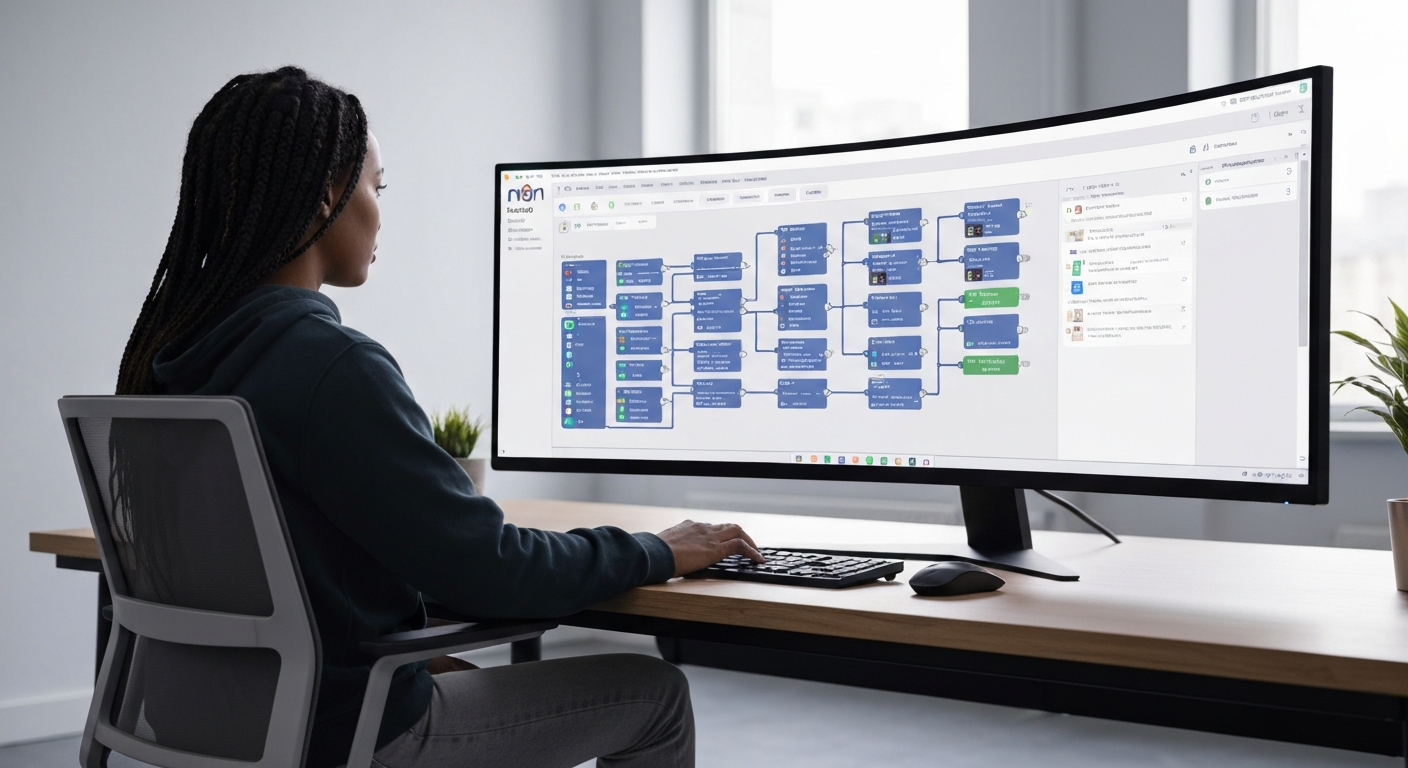
    n8n workflow builder interface on a large curved monitor showing a complex AI agent workflow with.

    Implementation Benefits:

      • Specialized Expertise: Each agent optimized for specific capabilities

      • Clear Responsibility Separation: Easier debugging and performance optimization

      • Modular Design: Individual agent updates without affecting entire workflow

    Real-World Example:

      1. Contact Agent: Searches CRM, validates recipient information, determines communication preferences

      1. Composition Agent: Creates personalized content based on contact history and current context

      1. Delivery Agent: Handles sending, tracking, and automated follow-up sequences

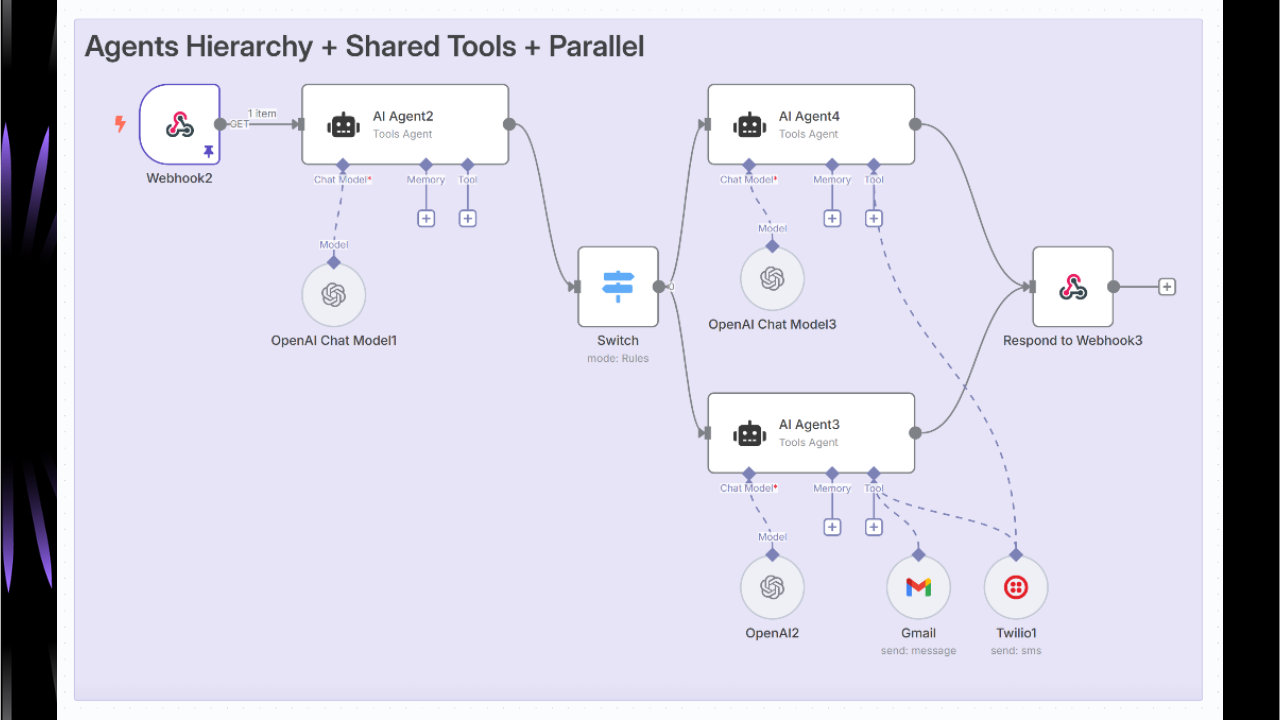
    Parallel Agent Hierarchy with Shared Tools (Twilio Integration)

    Multiple agents operating simultaneously while sharing access to common resources:

    Architecture Benefits:

      • Parallel Processing: Significant speed improvements for multi-channel operations

      • Shared Resource Coordination: Efficient utilization of APIs and databases
        • File system access for document processing

        • Message queue integration for asynchronous operations

      LangChain Integration with n8n AI Agent Systems

      ReAct AI Pattern Implementation

      The ReAct (Reasoning and Acting) pattern enables agents to:

        • Reason about problems and plan solutions

        • Act by executing tools and gathering information

        • Observe results and adjust strategies accordingly

      This pattern is implemented through specialized prompt templates and tool calling interfaces within the n8n environment.

      Understanding the n8n AI Agent Reasoning Engine

      The reasoning engine operates through three core phases:

      1. Perception: Unlike simple chatbots, AI agents use multi-step prompting techniques to make decisions. Through chains of specialized prompts (reasoning, tool selection), agents can handle complex scenarios that are not possible with single-shot responses.

      2. Decision-Making: The LLM analyzes input context, evaluates available tools, and develops execution plans based on configured system prompts and historical interactions.

      3. Action Execution: Agents execute planned actions using connected tools and APIs, then process results to determine next steps or provide final responses.

      n8n AI Agent Node Types and Capabilities

      The Tools Agent implementation serves as the primary recommended approach for most use cases.

      Core Functionality:

        • Enhanced ability to work with tools and ensure standard output format

        • Implements LangChain’s tool calling interface for describing available tools and schemas

        • Improved output parsing capabilities through formatting tool integration

      Configuration Best Practices:

        • Connect at least one tool sub-node to the AI Agent node

        • Configure clear tool descriptions for optimal selection

        • Set appropriate system messages for agent behavior guidance

      Conversational Agent: For Models Without Native Tool Calling

      When to Use:

        • Legacy LLM models without function calling capabilities

        • Simple conversational interfaces without external tool requirements

        • Testing and development scenarios with limited integration needs

      Setup Considerations:

        • Limited to text-based interactions

        • Requires manual result processing for complex outputs

        • Best suited for content generation and analysis tasks

      OpenAI Functions Agent: For OpenAI Function Models

      Function Calling Capabilities:

        • Native integration with OpenAI’s function calling API

        • Structured output generation for reliable tool integration

        • Advanced parameter validation and error handling

      Performance Optimization:

        • Reduced token usage through efficient function descriptions

        • Faster execution through optimized API calls

        • Better reliability through structured output validation

      Plan and Execute Agent: For Complex Multi-Step Tasks

      Task Planning Features:

        • Automatic breakdown of complex requests into manageable steps

        • Dynamic execution planning based on intermediate results

        • Progress tracking and milestone validation

      Use Case Applications:

        • Multi-stage data processing workflows

        • Complex business process automation

        • Project management and task coordination

      SQL Agent: For Database Interactions

      Natural Language to SQL Translation: Instead of overloading the LLM context window with raw data, our agent will use SQL to efficiently query the database – just like human analysts do.

      Implementation Example:

      User Query: "What are our top-selling products this quarter by region?"
      Agent Process: 
      - Interprets intent and identifies required data tables
      - Generates optimized SQL query with proper joins and filters  
      - Executes query on connected database with security controls
      - Formats results with regional breakdown and insights
      - Suggests follow-up analysis opportunities

      Types of n8n AI Agents: 8 Essential Architectures

      Recent comprehensive analysis from ProductCompass’s AI Agent Architecture guide identifies eight essential agent configurations for production implementations.

      Five Single n8n AI Agent Architectures

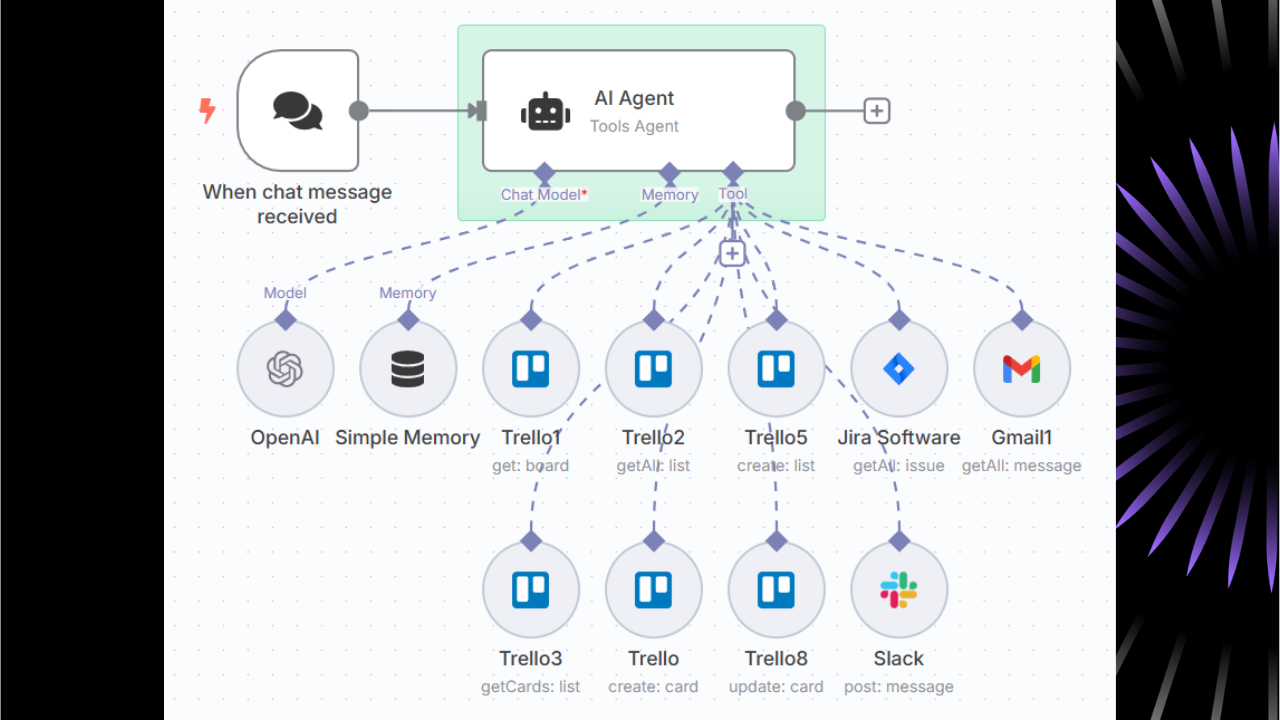
      Tool-Based AI Agent (Multi-Tool Chat Orchestration)

      This foundational architecture enables an AI agent to access multiple tools based on chat messages. The agent can:

        • Access contact databases and customer information

        • Send emails and calendar invitations

        • Manage scheduling and event coordination

        • Perform web searches and data lookups

        • Execute complex business logic through tool combinations

      Implementation Pattern:

      Chat Trigger → AI Agent Node → Multiple Tool Nodes (Gmail, Contacts, Calendar, SerpAPI)

      Best Use Cases: Personal assistants, customer service automation, administrative task coordination

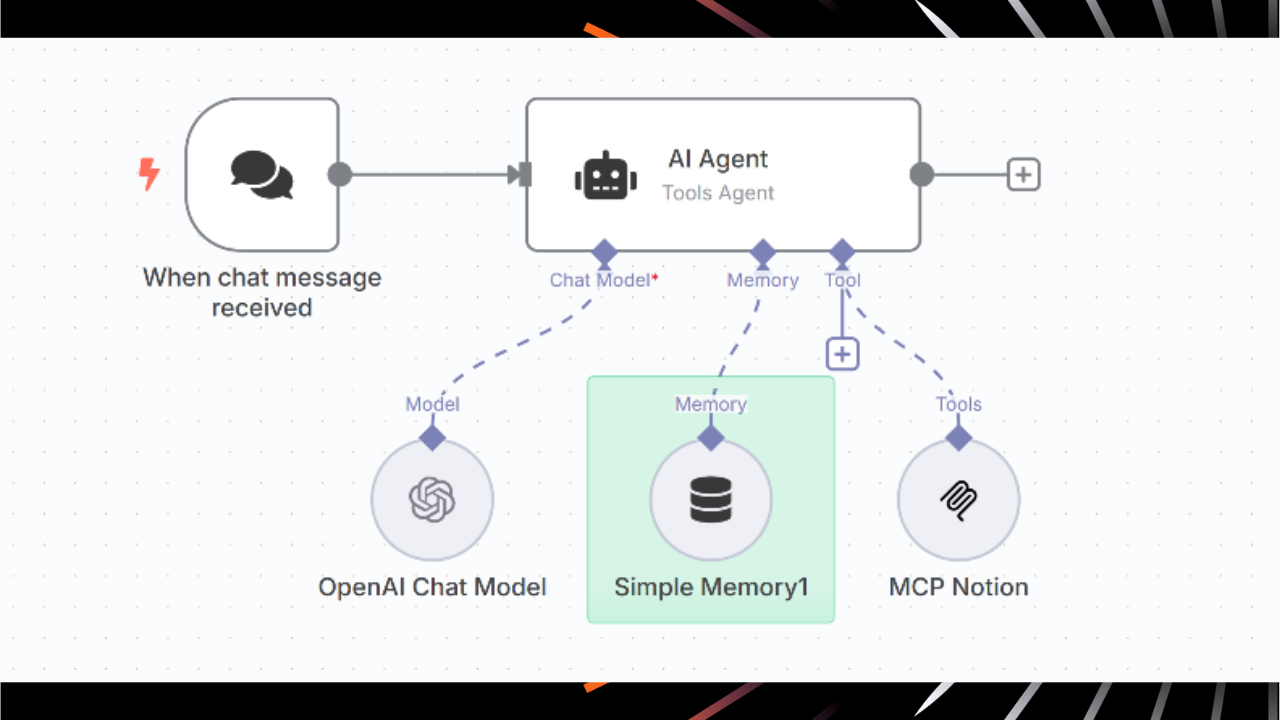
      MCP Server Integration Agent (Enterprise Webhook-Triggered)

      This advanced architecture combines Model Context Protocol (MCP) servers with traditional tools for enterprise environments:

      Key Components:

        • MCP servers for deep enterprise integrations (Atlassian, Jira, Confluence)

        • Webhook triggers for external application initialization

        • Traditional tools for standard operations

        • Event-driven activation from multiple system sources

      Enterprise Benefits:

        • Deep integration with existing enterprise software stacks

        • Scalable architecture supporting large organizational workflows

        • Event-driven operation reducing manual intervention requirements

      Router-Based Agentic Workflow (Conditional Logic Agent)

      This pattern uses intelligent routing to direct different types of requests to specialized processing paths:

      Architecture Components:

        1. Classification Agent: AI-powered request categorization and complexity assessment

        1. Routing Logic: Intelligent direction to appropriate sub-workflows

        1. Specialized Handlers: Optimized agent configurations for specific scenarios

        1. Result Aggregation: Unified output formatting and response coordination

      Implementation Benefits:

        • Improved efficiency through specialized processing

        • Better resource utilization and cost optimization

        • Enhanced maintainability through modular design

      Human-in-the-Loop AI Agent (Approval-Based Workflow)

      Critical for sensitive operations requiring human oversight:

      Workflow Pattern:

        1. Automated Processing: AI handles standard operations up to decision points

        1. Human Approval Request: Automated notifications via Slack, email, or custom interfaces

        1. Conditional Execution: Workflow continues based on approval response

        1. Audit Trail Generation: Comprehensive logging for compliance and accountability

      Use Cases: Financial transactions, sensitive data operations, high-stakes communications, regulatory compliance workflows

      Dynamic Agent Calling System (Autonomous AI Coordination)

      The most sophisticated single-agent architecture enabling autonomous multi-agent coordination:

      Core Capabilities:

        • Task Complexity Assessment: Intelligent evaluation of resource requirements

        • Autonomous Agent Invocation: Dynamic calling of specialist agents when needed

        • Inter-Agent Communication: Coordinated information sharing and task delegation

        • Resource Optimization: Intelligent workload distribution and cost management

      Three Multiple n8n AI Agent Architectures

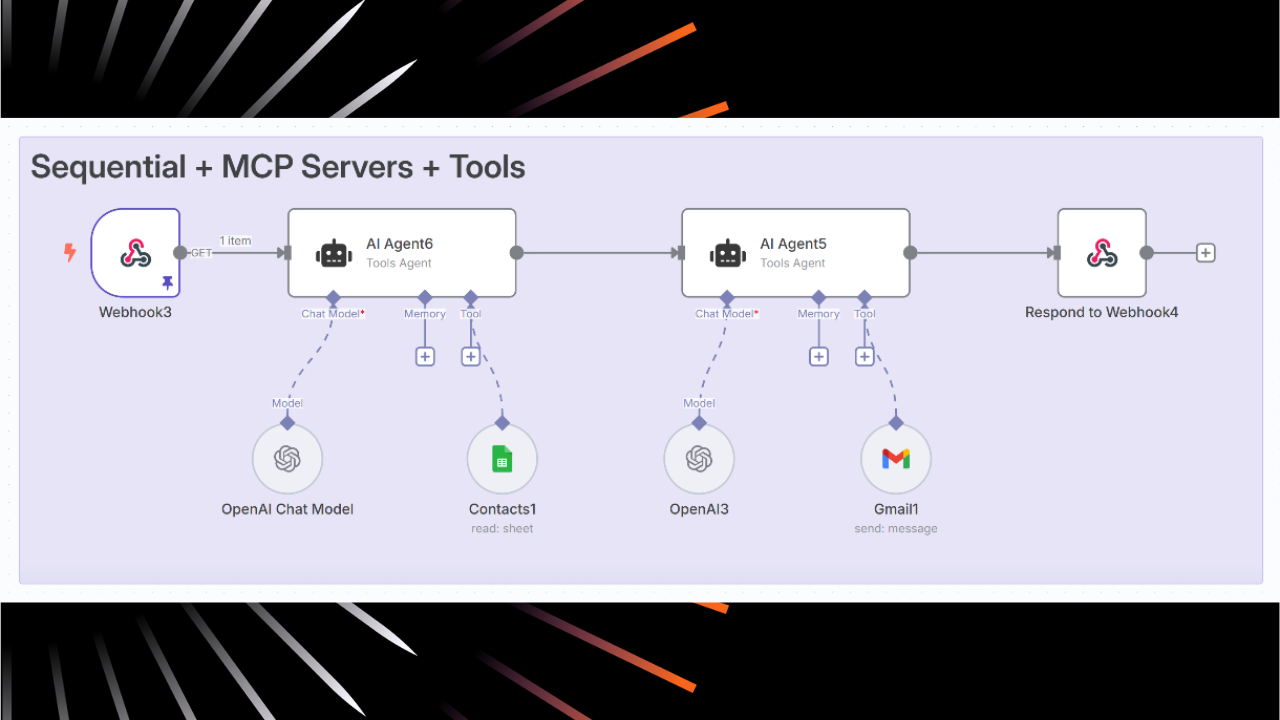
      Sequential AI Agent Processing (Contact → Email Chain)

      Workflow Pattern: Agent 1 (Contact Analysis) → Agent 2 (Email Composition) → Agent 3 (Send & Follow-up)

      Implementation Benefits:

        • Specialized Expertise: Each agent optimized for specific capabilities

        • Clear Responsibility Separation: Easier debugging and performance optimization

        • Modular Design: Individual agent updates without affecting entire workflow

      Real-World Example:

        1. Contact Agent: Searches CRM, validates recipient information, determines communication preferences

        1. Composition Agent: Creates personalized content based on contact history and current context

        1. Delivery Agent: Handles sending, tracking, and automated follow-up sequences

      Parallel Agent Hierarchy with Shared Tools (Twilio Integration)

      Multiple agents operating simultaneously while sharing access to common resources:

      Architecture Benefits:

        • Parallel Processing: Significant speed improvements for multi-channel operations

        • Shared Resource Coordination: Efficient utilization of APIs and databases

        • Result Aggregation: Comprehensive outputs combining multiple perspectives

        • Scalable Design: Easy addition of new agents without architecture changes

      Use Cases: Multi-channel communication campaigns, parallel data processing across different sources, distributed analysis tasks

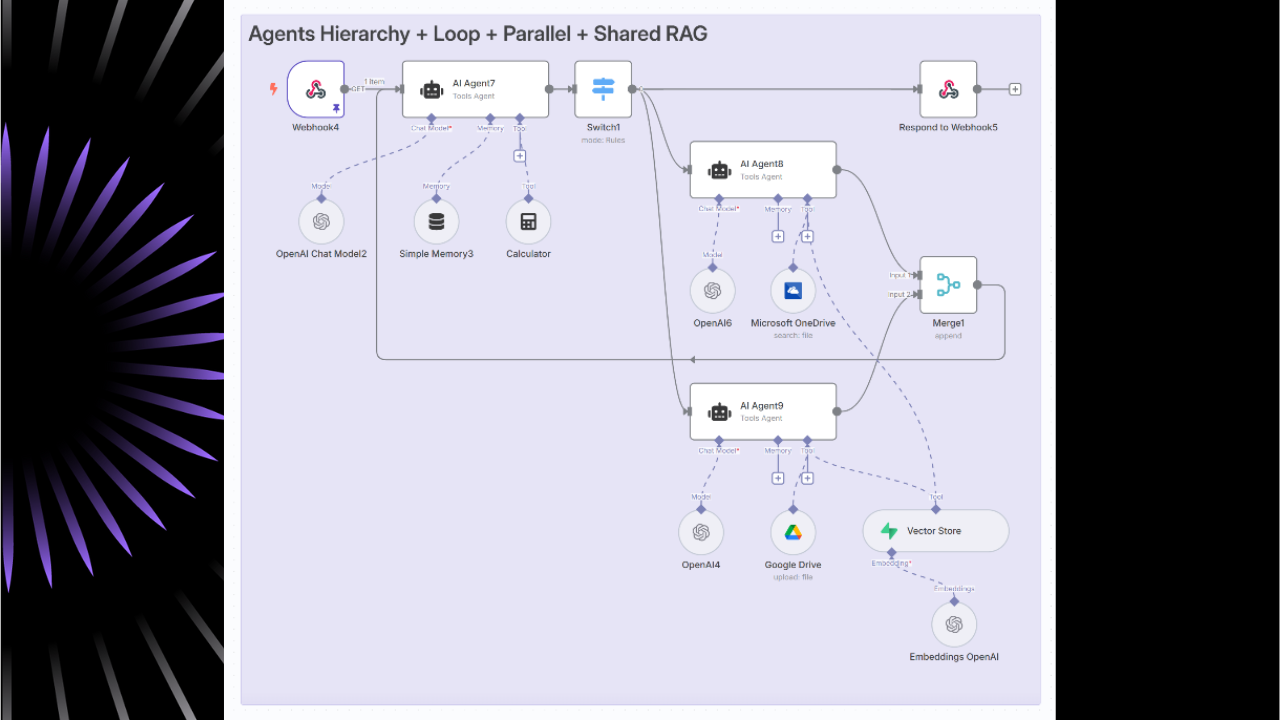
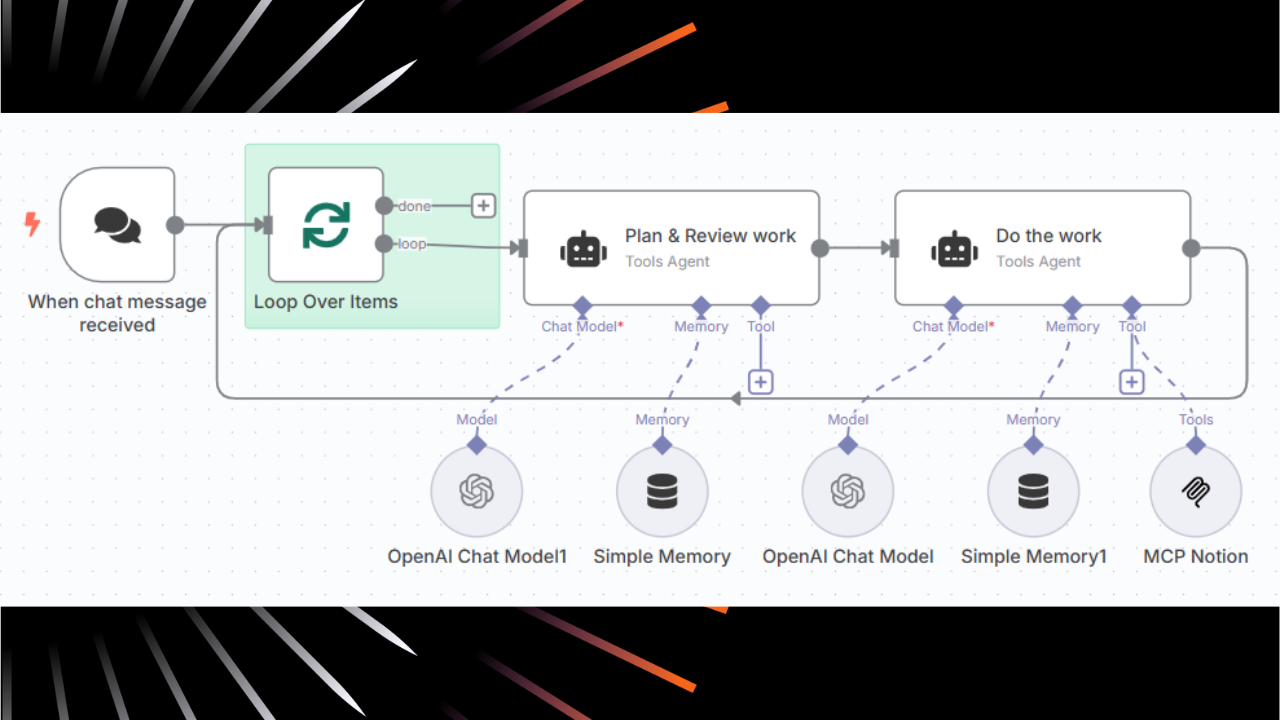
      Hierarchical Agents with Loop and Shared RAG (Parallel Search + Merge)

      The most advanced multi-agent pattern featuring:

      Core Components:

        • Supervisor Agents: High-level coordination and decision-making

        • Worker Agents: Specialized task execution and data processing

        • Shared RAG System: Common knowledge base with parallel search capabilities

        • Iterative Refinement: Feedback loops for continuous improvement

      Implementation Benefits:

        • Comprehensive knowledge coverage across multiple domains

        • Reduced latency through parallel processing

        • Quality improvement through multiple agent perspectives

        • Scalable architecture for large knowledge bases

      Setting Up Your First n8n AI Agent: Step-by-Step Tutorial

      Prerequisites and Environment Setup

      Required Components:

      Following n8n’s introductory tutorial, building AI workflows involves understanding how the building blocks fit together.

        1. n8n Instance: Cloud account (free trial available) or self-hosted installation

        1. LLM API Access: OpenAI, Google, Anthropic, or open-source alternatives

        1. Integration Credentials: For target applications (Gmail, Slack, databases)

      Creating the Basic n8n AI Agent Workflow

      Step 1: Adding and Configuring the Chat Trigger Node

      Every workflow needs somewhere to start. In n8n these are called ‘trigger nodes’. For this workflow, we want to start with a chat node.

        1. Create new workflow in n8n interface

        1. Add “Chat Trigger” node from the node palette

        1. Configure for manual testing using built-in chat interface

        1. Set up webhook URL if external integration is required

      Step 2: Setting Up the n8n AI Agent Node

      The AI Agent node is the core of adding AI to your workflows.

        1. Add “AI Agent” node after Chat Trigger

        1. Configure prompt source (automatic from chat trigger recommended)

        1. Define system message for agent behavior and capabilities

      Optimized System Message Example:

      You are a helpful business assistant with access to email, calendar, and contact management tools.
      Your capabilities include:
      - Searching and managing customer contacts
      - Sending emails and calendar invitations
      - Scheduling meetings and coordinating events
      - Accessing company knowledge base for information retrieval
      Guidelines:
      - Always confirm actions before executing them
      - Ask for clarification when requests are ambiguous
      - Maintain professional communication style
      - Escalate complex issues to human operators when appropriate

      Step 3: Connecting Chat Models

      AI agents require a chat model to process incoming prompts:

        1. Click the “+” button under Chat Model connection

        1. Select preferred model (OpenAI GPT-4, Google Gemini, Anthropic Claude)

        1. Configure API credentials securely through n8n’s credential system

        1. Set model parameters:
            • Temperature: 0.3 for consistent responses, 0.7 for creative tasks

            • Max Tokens: Set appropriate limits based on use case requirements

            • Model Version: Use latest stable release for optimal performance

      Memory and Context Management in n8n AI Agents

      Short-Term Memory: Window Buffer Implementation

      In order to remember what has happened in the conversation, the AI Agent needs to preserve context.

        1. Click “+” under Memory connection on AI Agent node

        1. Add “Simple Memory” node for conversation history

        1. Configure memory settings:
            • Memory Window: 5-10 interactions for most use cases
            • File system access for document processing

            • Message queue integration for asynchronous operations

          LangChain Integration with n8n AI Agent Systems

          ReAct AI Pattern Implementation

          The ReAct (Reasoning and Acting) pattern enables agents to:

            • Reason about problems and plan solutions

            • Act by executing tools and gathering information

            • Observe results and adjust strategies accordingly

          This pattern is implemented through specialized prompt templates and tool calling interfaces within the n8n environment.

          Understanding the n8n AI Agent Reasoning Engine

          The reasoning engine operates through three core phases:

          1. Perception: Unlike simple chatbots, AI agents use multi-step prompting techniques to make decisions. Through chains of specialized prompts (reasoning, tool selection), agents can handle complex scenarios that are not possible with single-shot responses.

          2. Decision-Making: The LLM analyzes input context, evaluates available tools, and develops execution plans based on configured system prompts and historical interactions.

          3. Action Execution: Agents execute planned actions using connected tools and APIs, then process results to determine next steps or provide final responses.

          n8n AI Agent Node Types and Capabilities

          The Tools Agent implementation serves as the primary recommended approach for most use cases.

          Core Functionality:

            • Enhanced ability to work with tools and ensure standard output format

            • Implements LangChain’s tool calling interface for describing available tools and schemas

            • Improved output parsing capabilities through formatting tool integration

          Configuration Best Practices:

            • Connect at least one tool sub-node to the AI Agent node

            • Configure clear tool descriptions for optimal selection

            • Set appropriate system messages for agent behavior guidance

          Conversational Agent: For Models Without Native Tool Calling

          When to Use:

            • Legacy LLM models without function calling capabilities

            • Simple conversational interfaces without external tool requirements

            • Testing and development scenarios with limited integration needs

          Setup Considerations:

            • Limited to text-based interactions

            • Requires manual result processing for complex outputs

            • Best suited for content generation and analysis tasks

          OpenAI Functions Agent: For OpenAI Function Models

          Function Calling Capabilities:

            • Native integration with OpenAI’s function calling API

            • Structured output generation for reliable tool integration

            • Advanced parameter validation and error handling

          Performance Optimization:

            • Reduced token usage through efficient function descriptions

            • Faster execution through optimized API calls

            • Better reliability through structured output validation

          Plan and Execute Agent: For Complex Multi-Step Tasks

          Task Planning Features:

            • Automatic breakdown of complex requests into manageable steps

            • Dynamic execution planning based on intermediate results

            • Progress tracking and milestone validation

          Use Case Applications:

            • Multi-stage data processing workflows

            • Complex business process automation

            • Project management and task coordination

          SQL Agent: For Database Interactions

          Natural Language to SQL Translation: Instead of overloading the LLM context window with raw data, our agent will use SQL to efficiently query the database – just like human analysts do.

          Implementation Example:

          User Query: "What are our top-selling products this quarter by region?"
          Agent Process: 
          - Interprets intent and identifies required data tables
          - Generates optimized SQL query with proper joins and filters  
          - Executes query on connected database with security controls
          - Formats results with regional breakdown and insights
          - Suggests follow-up analysis opportunities

          Types of n8n AI Agents: 8 Essential Architectures

          Recent comprehensive analysis from ProductCompass’s AI Agent Architecture guide identifies eight essential agent configurations for production implementations.

          Five Single n8n AI Agent Architectures

          Tool-Based AI Agent (Multi-Tool Chat Orchestration)

          This foundational architecture enables an AI agent to access multiple tools based on chat messages. The agent can:

            • Access contact databases and customer information

            • Send emails and calendar invitations

            • Manage scheduling and event coordination

            • Perform web searches and data lookups

            • Execute complex business logic through tool combinations

          Implementation Pattern:

          Chat Trigger → AI Agent Node → Multiple Tool Nodes (Gmail, Contacts, Calendar, SerpAPI)

          Best Use Cases: Personal assistants, customer service automation, administrative task coordination

          MCP Server Integration Agent (Enterprise Webhook-Triggered)

          This advanced architecture combines Model Context Protocol (MCP) servers with traditional tools for enterprise environments:

          Key Components:

            • MCP servers for deep enterprise integrations (Atlassian, Jira, Confluence)

            • Webhook triggers for external application initialization

            • Traditional tools for standard operations

            • Event-driven activation from multiple system sources

          Enterprise Benefits:

            • Deep integration with existing enterprise software stacks

            • Scalable architecture supporting large organizational workflows

            • Event-driven operation reducing manual intervention requirements

          Router-Based Agentic Workflow (Conditional Logic Agent)

          This pattern uses intelligent routing to direct different types of requests to specialized processing paths:

          Architecture Components:

            1. Classification Agent: AI-powered request categorization and complexity assessment

            1. Routing Logic: Intelligent direction to appropriate sub-workflows

            1. Specialized Handlers: Optimized agent configurations for specific scenarios

            1. Result Aggregation: Unified output formatting and response coordination

          Implementation Benefits:

            • Improved efficiency through specialized processing

            • Better resource utilization and cost optimization

            • Enhanced maintainability through modular design

          Human-in-the-Loop AI Agent (Approval-Based Workflow)

          Critical for sensitive operations requiring human oversight:

          Workflow Pattern:

            1. Automated Processing: AI handles standard operations up to decision points

            1. Human Approval Request: Automated notifications via Slack, email, or custom interfaces

            1. Conditional Execution: Workflow continues based on approval response

            1. Audit Trail Generation: Comprehensive logging for compliance and accountability

          Use Cases: Financial transactions, sensitive data operations, high-stakes communications, regulatory compliance workflows

          Dynamic Agent Calling System (Autonomous AI Coordination)

          The most sophisticated single-agent architecture enabling autonomous multi-agent coordination:

          Core Capabilities:

            • Task Complexity Assessment: Intelligent evaluation of resource requirements

            • Autonomous Agent Invocation: Dynamic calling of specialist agents when needed

            • Inter-Agent Communication: Coordinated information sharing and task delegation

            • Resource Optimization: Intelligent workload distribution and cost management

          Three Multiple n8n AI Agent Architectures

          Sequential AI Agent Processing (Contact → Email Chain)

          Workflow Pattern: Agent 1 (Contact Analysis) → Agent 2 (Email Composition) → Agent 3 (Send & Follow-up)

          Implementation Benefits:

            • Specialized Expertise: Each agent optimized for specific capabilities

            • Clear Responsibility Separation: Easier debugging and performance optimization

            • Modular Design: Individual agent updates without affecting entire workflow

          Real-World Example:

            1. Contact Agent: Searches CRM, validates recipient information, determines communication preferences

            1. Composition Agent: Creates personalized content based on contact history and current context

            1. Delivery Agent: Handles sending, tracking, and automated follow-up sequences

          Parallel Agent Hierarchy with Shared Tools (Twilio Integration)

          Multiple agents operating simultaneously while sharing access to common resources:

          Architecture Benefits:

            • Parallel Processing: Significant speed improvements for multi-channel operations

            • Shared Resource Coordination: Efficient utilization of APIs and databases

            • Result Aggregation: Comprehensive outputs combining multiple perspectives

            • Scalable Design: Easy addition of new agents without architecture changes

          Use Cases: Multi-channel communication campaigns, parallel data processing across different sources, distributed analysis tasks

          Hierarchical Agents with Loop and Shared RAG (Parallel Search + Merge)

          The most advanced multi-agent pattern featuring:

          Core Components:

            • Supervisor Agents: High-level coordination and decision-making

            • Worker Agents: Specialized task execution and data processing

            • Shared RAG System: Common knowledge base with parallel search capabilities

            • Iterative Refinement: Feedback loops for continuous improvement

          Implementation Benefits:

            • Comprehensive knowledge coverage across multiple domains

            • Reduced latency through parallel processing

            • Quality improvement through multiple agent perspectives

            • Scalable architecture for large knowledge bases

          Setting Up Your First n8n AI Agent: Step-by-Step Tutorial

          Prerequisites and Environment Setup

          Required Components:

          Following n8n’s introductory tutorial, building AI workflows involves understanding how the building blocks fit together.

            1. n8n Instance: Cloud account (free trial available) or self-hosted installation

            1. LLM API Access: OpenAI, Google, Anthropic, or open-source alternatives

            1. Integration Credentials: For target applications (Gmail, Slack, databases)

          Creating the Basic n8n AI Agent Workflow

          Step 1: Adding and Configuring the Chat Trigger Node

          Every workflow needs somewhere to start. In n8n these are called ‘trigger nodes’. For this workflow, we want to start with a chat node.

            1. Create new workflow in n8n interface

            1. Add “Chat Trigger” node from the node palette

            1. Configure for manual testing using built-in chat interface

            1. Set up webhook URL if external integration is required

          Step 2: Setting Up the n8n AI Agent Node

          The AI Agent node is the core of adding AI to your workflows.

            1. Add “AI Agent” node after Chat Trigger

            1. Configure prompt source (automatic from chat trigger recommended)

            1. Define system message for agent behavior and capabilities

          Optimized System Message Example:

          You are a helpful business assistant with access to email, calendar, and contact management tools.
          Your capabilities include:
          - Searching and managing customer contacts
          - Sending emails and calendar invitations
          - Scheduling meetings and coordinating events
          - Accessing company knowledge base for information retrieval
          Guidelines:
          - Always confirm actions before executing them
          - Ask for clarification when requests are ambiguous
          - Maintain professional communication style
          - Escalate complex issues to human operators when appropriate

          Step 3: Connecting Chat Models

          AI agents require a chat model to process incoming prompts:

            1. Click the “+” button under Chat Model connection

            1. Select preferred model (OpenAI GPT-4, Google Gemini, Anthropic Claude)

            1. Configure API credentials securely through n8n’s credential system

            1. Set model parameters:
                • Temperature: 0.3 for consistent responses, 0.7 for creative tasks

                • Max Tokens: Set appropriate limits based on use case requirements

                • Model Version: Use latest stable release for optimal performance

          Memory and Context Management in n8n AI Agents

          Short-Term Memory: Window Buffer Implementation

          In order to remember what has happened in the conversation, the AI Agent needs to preserve context.

            1. Click “+” under Memory connection on AI Agent node

            1. Add “Simple Memory” node for conversation history

            1. Configure memory settings:
                • Memory Window: 5-10 interactions for most use cases

                • Buffer Size: Optimize based on context requirements

                • Conversation Tracking: Enable for multi-turn interactions

          Long-Term Memory: Database and Custom Storage Solutions

          For persistent memory beyond simple conversation history:

          Database Integration Options:

            • PostgreSQL: Structured conversation storage with querying capabilities

            • MongoDB: Flexible document storage for complex conversation data

            • Vector Databases: Semantic search capabilities for knowledge retrieval

          Implementation Pattern:

          Conversation Input → Memory Processing → Database Storage → Context Retrieval → Agent Response

          Testing and Debugging Your n8n AI Agent

          Using the Built-in Chat Interface

            1. Click the ‘Chat’ button near the bottom of the canvas

            1. Open local chat window for direct agent interaction

            1. Test various scenarios and edge cases

            1. Monitor agent logs in the right panel for debugging

          Analyzing AI Agent Logs and Performance

          Common issues and resolution steps are documented in n8n’s troubleshooting guide.

          Key Metrics to Monitor:

            • Response time and execution duration

            • Token usage and API costs

            • Tool selection accuracy

            • Error rates and failure patterns

            • Memory usage and context efficiency

          Advanced n8n AI Agent Configurations

          Retrieval-Augmented Generation (RAG) with n8n AI Agents

          Vector Database Setup and Configuration (Pinecone, Qdrant)

          Pinecone Integration:

            1. Create Pinecone account and obtain API keys

            1. Configure vector dimensions based on embedding model

            1. Set up index with appropriate metadata fields

            1. Connect to n8n through HTTP Request or dedicated nodes

          Qdrant Configuration:

            1. Deploy Qdrant instance (cloud or self-hosted)

            1. Create collections with vector and payload schemas

            1. Configure embedding model compatibility

            1. Integrate with n8n agent workflows

          Building Custom Knowledge Chatbots

          Implementation Steps:

            1. Document Processing: Chunk and embed knowledge base content

            1. Vector Storage: Index embeddings in chosen vector database

            1. Retrieval Logic: Implement semantic search functionality

            1. Context Integration: Combine retrieved knowledge with agent prompts

            1. Response Generation: Generate informed responses using augmented context

          Agents vs Chains in n8n Workflows

          Understanding the Distinction

          Chains: Predetermined sequences of operations with fixed execution order Agents: Dynamic decision-makers that choose tools and execution paths based on context

          When to Use Agents vs Chains

          Use Chains When:

            • Workflow steps are well-defined and consistent

            • Predictable input/output patterns

            • Performance optimization is critical

            • Debugging complexity needs to be minimized

          Use Agents When:

            • Dynamic decision-making is required

            • Multiple tool options are available

            • Handling unpredictable inputs

            • Adaptive behavior based on context is needed

          Performance Optimization for n8n AI Agents

          Cost Management and Token Optimization

          Token Usage Optimization Strategies

          Prompt Optimization:

            • Use concise, clear system messages

            • Implement dynamic context truncation

            • Cache frequently used prompt components

            • Optimize tool descriptions for clarity and brevity

          Model Selection for Cost Efficiency:

            • Use appropriate model sizes for task complexity

            • Implement model routing based on query type

            • Consider open-source alternatives for non-sensitive operations

            • Monitor and optimize API usage patterns

          Caching Mechanisms for Repeated Queries

          Response Caching Implementation:

          javascript

          // Example caching logic for n8n Code node
          const cache = new Map();
          const cacheKey = `${query}_${context}`;
          if (cache.has(cacheKey)) {
              return cache.get(cacheKey);
          }
          const response = await processQuery(query, context);
          cache.set(cacheKey, response);
          return response;

          Memory Management and Context Optimization

          Memory Usage Optimization:

            • Configure appropriate memory windows based on use case

            • Implement conversation summarization for long sessions

            • Use persistent storage judiciously

            • Monitor memory usage patterns and optimize accordingly

          Benchmarking and Performance Measurement:

            • Track response times across different agent configurations

            • Monitor token usage and cost per interaction

            • Measure tool selection accuracy and efficiency

            • Analyze conversation quality and user satisfaction metrics

          Security Best Practices for n8n AI Agents

          Data Privacy and External LLM Considerations

          Handling Sensitive Information in Agent Workflows

          Data Classification Framework:

            • Public: No restrictions on processing

            • Internal: Company-specific but non-sensitive

            • Confidential: Restricted access required

            • Highly Confidential: Maximum security controls

          Implementation Strategies:

            • Use data masking for sensitive information in LLM requests

            • Implement local processing for highly sensitive data

            • Configure data retention policies for conversation logs

            • Establish clear data handling procedures for different classification levels

          GDPR, HIPAA, and Regulatory Compliance

          GDPR Compliance Requirements:

            • Implement data subject access rights
              • File system access for document processing

              • Message queue integration for asynchronous operations

            LangChain Integration with n8n AI Agent Systems

            ReAct AI Pattern Implementation

            The ReAct (Reasoning and Acting) pattern enables agents to:

              • Reason about problems and plan solutions

              • Act by executing tools and gathering information

              • Observe results and adjust strategies accordingly

            This pattern is implemented through specialized prompt templates and tool calling interfaces within the n8n environment.

            Understanding the n8n AI Agent Reasoning Engine

            The reasoning engine operates through three core phases:

            1. Perception: Unlike simple chatbots, AI agents use multi-step prompting techniques to make decisions. Through chains of specialized prompts (reasoning, tool selection), agents can handle complex scenarios that are not possible with single-shot responses.

            2. Decision-Making: The LLM analyzes input context, evaluates available tools, and develops execution plans based on configured system prompts and historical interactions.

            3. Action Execution: Agents execute planned actions using connected tools and APIs, then process results to determine next steps or provide final responses.

            n8n AI Agent Node Types and Capabilities

            The Tools Agent implementation serves as the primary recommended approach for most use cases.

            Core Functionality:

              • Enhanced ability to work with tools and ensure standard output format

              • Implements LangChain’s tool calling interface for describing available tools and schemas

              • Improved output parsing capabilities through formatting tool integration

            Configuration Best Practices:

              • Connect at least one tool sub-node to the AI Agent node

              • Configure clear tool descriptions for optimal selection

              • Set appropriate system messages for agent behavior guidance

            Conversational Agent: For Models Without Native Tool Calling

            When to Use:

              • Legacy LLM models without function calling capabilities

              • Simple conversational interfaces without external tool requirements

              • Testing and development scenarios with limited integration needs

            Setup Considerations:

              • Limited to text-based interactions

              • Requires manual result processing for complex outputs

              • Best suited for content generation and analysis tasks

            OpenAI Functions Agent: For OpenAI Function Models

            Function Calling Capabilities:

              • Native integration with OpenAI’s function calling API

              • Structured output generation for reliable tool integration

              • Advanced parameter validation and error handling

            Performance Optimization:

              • Reduced token usage through efficient function descriptions

              • Faster execution through optimized API calls

              • Better reliability through structured output validation

            Plan and Execute Agent: For Complex Multi-Step Tasks

            Task Planning Features:

              • Automatic breakdown of complex requests into manageable steps

              • Dynamic execution planning based on intermediate results

              • Progress tracking and milestone validation

            Use Case Applications:

              • Multi-stage data processing workflows

              • Complex business process automation

              • Project management and task coordination

            SQL Agent: For Database Interactions

            Natural Language to SQL Translation: Instead of overloading the LLM context window with raw data, our agent will use SQL to efficiently query the database – just like human analysts do.

            Implementation Example:

            User Query: "What are our top-selling products this quarter by region?"
            Agent Process: 
            - Interprets intent and identifies required data tables
            - Generates optimized SQL query with proper joins and filters  
            - Executes query on connected database with security controls
            - Formats results with regional breakdown and insights
            - Suggests follow-up analysis opportunities

            Types of n8n AI Agents: 8 Essential Architectures

            Recent comprehensive analysis from ProductCompass’s AI Agent Architecture guide identifies eight essential agent configurations for production implementations.

            Five Single n8n AI Agent Architectures

            Tool-Based AI Agent (Multi-Tool Chat Orchestration)

            This foundational architecture enables an AI agent to access multiple tools based on chat messages. The agent can:

              • Access contact databases and customer information

              • Send emails and calendar invitations

              • Manage scheduling and event coordination

              • Perform web searches and data lookups

              • Execute complex business logic through tool combinations

            Implementation Pattern:

            Chat Trigger → AI Agent Node → Multiple Tool Nodes (Gmail, Contacts, Calendar, SerpAPI)

            Best Use Cases: Personal assistants, customer service automation, administrative task coordination

            MCP Server Integration Agent (Enterprise Webhook-Triggered)

            This advanced architecture combines Model Context Protocol (MCP) servers with traditional tools for enterprise environments:

            Key Components:

              • MCP servers for deep enterprise integrations (Atlassian, Jira, Confluence)

              • Webhook triggers for external application initialization

              • Traditional tools for standard operations

              • Event-driven activation from multiple system sources

            Enterprise Benefits:

              • Deep integration with existing enterprise software stacks

              • Scalable architecture supporting large organizational workflows

              • Event-driven operation reducing manual intervention requirements

            Router-Based Agentic Workflow (Conditional Logic Agent)

            This pattern uses intelligent routing to direct different types of requests to specialized processing paths:

            Architecture Components:

              1. Classification Agent: AI-powered request categorization and complexity assessment

              1. Routing Logic: Intelligent direction to appropriate sub-workflows

              1. Specialized Handlers: Optimized agent configurations for specific scenarios

              1. Result Aggregation: Unified output formatting and response coordination

            Implementation Benefits:

              • Improved efficiency through specialized processing

              • Better resource utilization and cost optimization

              • Enhanced maintainability through modular design

            Human-in-the-Loop AI Agent (Approval-Based Workflow)

            Critical for sensitive operations requiring human oversight:

            Workflow Pattern:

              1. Automated Processing: AI handles standard operations up to decision points

              1. Human Approval Request: Automated notifications via Slack, email, or custom interfaces

              1. Conditional Execution: Workflow continues based on approval response

              1. Audit Trail Generation: Comprehensive logging for compliance and accountability

            Use Cases: Financial transactions, sensitive data operations, high-stakes communications, regulatory compliance workflows

            Dynamic Agent Calling System (Autonomous AI Coordination)

            The most sophisticated single-agent architecture enabling autonomous multi-agent coordination:

            Core Capabilities:

              • Task Complexity Assessment: Intelligent evaluation of resource requirements

              • Autonomous Agent Invocation: Dynamic calling of specialist agents when needed

              • Inter-Agent Communication: Coordinated information sharing and task delegation

              • Resource Optimization: Intelligent workload distribution and cost management

            Three Multiple n8n AI Agent Architectures

            Sequential AI Agent Processing (Contact → Email Chain)

            Workflow Pattern: Agent 1 (Contact Analysis) → Agent 2 (Email Composition) → Agent 3 (Send & Follow-up)

            Implementation Benefits:

              • Specialized Expertise: Each agent optimized for specific capabilities

              • Clear Responsibility Separation: Easier debugging and performance optimization

              • Modular Design: Individual agent updates without affecting entire workflow

            Real-World Example:

              1. Contact Agent: Searches CRM, validates recipient information, determines communication preferences

              1. Composition Agent: Creates personalized content based on contact history and current context

              1. Delivery Agent: Handles sending, tracking, and automated follow-up sequences

            Parallel Agent Hierarchy with Shared Tools (Twilio Integration)

            Multiple agents operating simultaneously while sharing access to common resources:

            Architecture Benefits:

              • Parallel Processing: Significant speed improvements for multi-channel operations

              • Shared Resource Coordination: Efficient utilization of APIs and databases

              • Result Aggregation: Comprehensive outputs combining multiple perspectives

              • Scalable Design: Easy addition of new agents without architecture changes

            Use Cases: Multi-channel communication campaigns, parallel data processing across different sources, distributed analysis tasks

            Hierarchical Agents with Loop and Shared RAG (Parallel Search + Merge)

            The most advanced multi-agent pattern featuring:

            Core Components:

              • Supervisor Agents: High-level coordination and decision-making

              • Worker Agents: Specialized task execution and data processing

              • Shared RAG System: Common knowledge base with parallel search capabilities

              • Iterative Refinement: Feedback loops for continuous improvement

            Implementation Benefits:

              • Comprehensive knowledge coverage across multiple domains

              • Reduced latency through parallel processing

              • Quality improvement through multiple agent perspectives

              • Scalable architecture for large knowledge bases

            Setting Up Your First n8n AI Agent: Step-by-Step Tutorial

            Prerequisites and Environment Setup

            Required Components:

            Following n8n’s introductory tutorial, building AI workflows involves understanding how the building blocks fit together.

              1. n8n Instance: Cloud account (free trial available) or self-hosted installation

              1. LLM API Access: OpenAI, Google, Anthropic, or open-source alternatives

              1. Integration Credentials: For target applications (Gmail, Slack, databases)

            Creating the Basic n8n AI Agent Workflow

            Step 1: Adding and Configuring the Chat Trigger Node

            Every workflow needs somewhere to start. In n8n these are called ‘trigger nodes’. For this workflow, we want to start with a chat node.

              1. Create new workflow in n8n interface

              1. Add “Chat Trigger” node from the node palette

              1. Configure for manual testing using built-in chat interface

              1. Set up webhook URL if external integration is required

            Step 2: Setting Up the n8n AI Agent Node

            The AI Agent node is the core of adding AI to your workflows.

              1. Add “AI Agent” node after Chat Trigger

              1. Configure prompt source (automatic from chat trigger recommended)

              1. Define system message for agent behavior and capabilities

            Optimized System Message Example:

            You are a helpful business assistant with access to email, calendar, and contact management tools.
            Your capabilities include:
            - Searching and managing customer contacts
            - Sending emails and calendar invitations
            - Scheduling meetings and coordinating events
            - Accessing company knowledge base for information retrieval
            Guidelines:
            - Always confirm actions before executing them
            - Ask for clarification when requests are ambiguous
            - Maintain professional communication style
            - Escalate complex issues to human operators when appropriate

            Step 3: Connecting Chat Models

            AI agents require a chat model to process incoming prompts:

              1. Click the “+” button under Chat Model connection

              1. Select preferred model (OpenAI GPT-4, Google Gemini, Anthropic Claude)

              1. Configure API credentials securely through n8n’s credential system

              1. Set model parameters:
                  • Temperature: 0.3 for consistent responses, 0.7 for creative tasks

                  • Max Tokens: Set appropriate limits based on use case requirements

                  • Model Version: Use latest stable release for optimal performance

            Memory and Context Management in n8n AI Agents

            Short-Term Memory: Window Buffer Implementation

            In order to remember what has happened in the conversation, the AI Agent needs to preserve context.

              1. Click “+” under Memory connection on AI Agent node

              1. Add “Simple Memory” node for conversation history

              1. Configure memory settings:
                  • Memory Window: 5-10 interactions for most use cases

                  • Buffer Size: Optimize based on context requirements

                  • Conversation Tracking: Enable for multi-turn interactions

            Long-Term Memory: Database and Custom Storage Solutions

            For persistent memory beyond simple conversation history:

            Database Integration Options:

              • PostgreSQL: Structured conversation storage with querying capabilities

              • MongoDB: Flexible document storage for complex conversation data

              • Vector Databases: Semantic search capabilities for knowledge retrieval

            Implementation Pattern:

            Conversation Input → Memory Processing → Database Storage → Context Retrieval → Agent Response

            Testing and Debugging Your n8n AI Agent

            Using the Built-in Chat Interface

              1. Click the ‘Chat’ button near the bottom of the canvas

              1. Open local chat window for direct agent interaction

              1. Test various scenarios and edge cases

              1. Monitor agent logs in the right panel for debugging

            Analyzing AI Agent Logs and Performance

            Common issues and resolution steps are documented in n8n’s troubleshooting guide.

            Key Metrics to Monitor:

              • Response time and execution duration

              • Token usage and API costs

              • Tool selection accuracy

              • Error rates and failure patterns

              • Memory usage and context efficiency

            Advanced n8n AI Agent Configurations

            Retrieval-Augmented Generation (RAG) with n8n AI Agents

            Vector Database Setup and Configuration (Pinecone, Qdrant)

            Pinecone Integration:

              1. Create Pinecone account and obtain API keys

              1. Configure vector dimensions based on embedding model

              1. Set up index with appropriate metadata fields

              1. Connect to n8n through HTTP Request or dedicated nodes

            Qdrant Configuration:

              1. Deploy Qdrant instance (cloud or self-hosted)

              1. Create collections with vector and payload schemas

              1. Configure embedding model compatibility

              1. Integrate with n8n agent workflows

            Building Custom Knowledge Chatbots

            Implementation Steps:

              1. Document Processing: Chunk and embed knowledge base content

              1. Vector Storage: Index embeddings in chosen vector database

              1. Retrieval Logic: Implement semantic search functionality

              1. Context Integration: Combine retrieved knowledge with agent prompts

              1. Response Generation: Generate informed responses using augmented context

            Agents vs Chains in n8n Workflows

            Understanding the Distinction

            Chains: Predetermined sequences of operations with fixed execution order Agents: Dynamic decision-makers that choose tools and execution paths based on context

            When to Use Agents vs Chains

            Use Chains When:

              • Workflow steps are well-defined and consistent

              • Predictable input/output patterns

              • Performance optimization is critical

              • Debugging complexity needs to be minimized

            Use Agents When:

              • Dynamic decision-making is required

              • Multiple tool options are available

              • Handling unpredictable inputs

              • Adaptive behavior based on context is needed

            Performance Optimization for n8n AI Agents

            Cost Management and Token Optimization

            Token Usage Optimization Strategies

            Prompt Optimization:

              • Use concise, clear system messages

              • Implement dynamic context truncation

              • Cache frequently used prompt components

              • Optimize tool descriptions for clarity and brevity

            Model Selection for Cost Efficiency:

              • Use appropriate model sizes for task complexity

              • Implement model routing based on query type

              • Consider open-source alternatives for non-sensitive operations

              • Monitor and optimize API usage patterns

            Caching Mechanisms for Repeated Queries

            Response Caching Implementation:

            javascript

            // Example caching logic for n8n Code node
            const cache = new Map();
            const cacheKey = `${query}_${context}`;
            if (cache.has(cacheKey)) {
                return cache.get(cacheKey);
            }
            const response = await processQuery(query, context);
            cache.set(cacheKey, response);
            return response;

            Memory Management and Context Optimization

            Memory Usage Optimization:

              • Configure appropriate memory windows based on use case

              • Implement conversation summarization for long sessions

              • Use persistent storage judiciously

              • Monitor memory usage patterns and optimize accordingly

            Benchmarking and Performance Measurement:

              • Track response times across different agent configurations

              • Monitor token usage and cost per interaction

              • Measure tool selection accuracy and efficiency

              • Analyze conversation quality and user satisfaction metrics

            Security Best Practices for n8n AI Agents

            Data Privacy and External LLM Considerations

            Handling Sensitive Information in Agent Workflows

            Data Classification Framework:

              • Public: No restrictions on processing

              • Internal: Company-specific but non-sensitive

              • Confidential: Restricted access required

              • Highly Confidential: Maximum security controls

            Implementation Strategies:

              • Use data masking for sensitive information in LLM requests

              • Implement local processing for highly sensitive data

              • Configure data retention policies for conversation logs

              • Establish clear data handling procedures for different classification levels

            GDPR, HIPAA, and Regulatory Compliance

            GDPR Compliance Requirements:

              • Implement data subject access rights

              • Ensure data portability and deletion capabilities

              • Maintain consent tracking and management

              • Establish data processing agreements with LLM providers

            HIPAA Considerations:

              • Use Business Associate Agreements (BAAs) with LLM providers

              • Implement comprehensive audit logging

              • Ensure data encryption in transit and at rest

              • Establish incident response procedures

            Authentication and Authorization Frameworks

            Credential Management and API Security

            Best Practices:

              • Store credentials using n8n’s secure credential system

              • Implement credential rotation procedures

              • Use environment-specific credential sets

              • Monitor credential usage and access patterns

            Access Control and Permission Management

            Role-Based Access Control (RBAC):

              • Define clear roles and permissions for agent access

              • Implement principle of least privilege

              • Regular access reviews and updates

              • Segregation of duties for sensitive operations

            n8n AI Agent Use Cases and Business Applications

            Customer Service and Support with n8n AI Agents

            Popular workflow templates like the AI Agent Chatbot with Long-Term Memory demonstrate sophisticated implementations with Google Docs integration and Telegram connectivity.

            Multi-Agent Architecture Implementation:

              • Triage Agent: Classifies inquiries and determines urgency levels

              • Knowledge Agent: Searches FAQ, documentation, and previous case history

              • Resolution Agent: Provides solutions and creates support tickets when needed

              • Follow-up Agent: Ensures customer satisfaction and case closure

            Implementation Benefits:

              • 24/7 availability with consistent response quality

              • Automatic escalation for complex issues requiring human intervention

              • Integration with existing help desk and CRM systems

              • Reduced response times and improved customer satisfaction scores

            Data Analysis and Business Intelligence AI Agents

            SQL AI Agent Implementation:

            Instead of overloading the LLM context window with raw data, our agent uses SQL to efficiently query databases – just like human analysts do.

            Workflow Process:

              1. Natural Language Interface: Business users ask questions in plain English

              1. Query Generation: Agent converts questions to optimized SQL queries

              1. Data Retrieval: Execute queries on connected databases with security controls

              1. Analysis & Visualization: Present findings with charts and actionable insights

              1. Report Generation: Create automated reports with key metrics and trends

            Content Creation and Management

            The n8n AI agents practical examples guide presents 15 real-world examples of AI agents automating tasks like data analysis and customer support.

            Social Media Automation Implementation:

              • Content Planning Agent: Develops content calendars based on trends and engagement data

              • Content Generation Agent: Creates platform-specific posts optimized for each channel

              • Publishing Agent: Schedules and distributes content across multiple platforms

              • Analytics Agent: Monitors performance and provides optimization recommendations

            Troubleshooting Common n8n AI Agent Issues

            n8n AI Agent Configuration and Setup Problems

            Chat Model Connection Errors

            This error displays when n8n runs into an issue with the Simple Memory sub-node. It most often occurs when your workflow or the workflow template you copied uses an older version of the Simple memory node.

            Common Solutions:

              • Remove existing memory node and re-add latest version

              • Verify API credentials and permissions

              • Check model availability and quota limits

              • Ensure proper network connectivity to LLM providers

            Memory Node Configuration Problems

            Troubleshooting Steps:

              1. Verify memory node version compatibility

              1. Check memory window size configuration

              1. Validate conversation context format

              1. Monitor memory usage patterns and optimization

            Advanced n8n AI Agent Debugging Techniques

            Log Analysis and Error Tracking

            Debugging Workflow:

              1. Enable Verbose Logging: Configure detailed logging for agent operations

              1. Analyze Execution Logs: Review step-by-step execution details

              1. Identify Bottlenecks: Locate performance issues and optimization opportunities

              1. Monitor Error Patterns: Track recurring issues and implement preventive measures

            Workflow Testing and Validation

            Testing Framework:

              • Unit Testing: Individual agent components and tool integrations

              • Integration Testing: End-to-end workflow validation

              • Performance Testing: Load testing and scalability validation

              • User Acceptance Testing: Real-world scenario validation

            n8n AI Agent Alternatives and Comparisons

            n8n AI Agent vs Other AI Automation Platforms

            n8n AI Agent vs Zapier AI Features

            n8n Advantages:

              • Open source foundation with community contributions

              • Self-hosting options for complete data control

              • Unlimited executions on self-hosted instances

              • Advanced AI agent capabilities with multi-agent support

            Zapier Advantages:

              • Larger pre-built integration ecosystem

              • Simpler setup for non-technical users

              • Established market presence with extensive documentation

            n8n AI Agent vs Make (Integromat) AI Capabilities

            n8n Advantages:

              • Superior AI integration with LangChain support

              • Cost-effective scaling for high-volume operations

              • Open source flexibility and customization

              • Advanced agent architectures and patterns

            Make Advantages:

              • Visual scenario builder with intuitive interface

              • Strong enterprise support and service level agreements

              • Comprehensive error handling and debugging tools

            When to Choose n8n AI Agent for Development

            Ideal Scenarios:

              • Rapid Prototyping Needs: Quick development and testing of AI workflows

              • Multi-System Integration: Complex workflows requiring numerous external connections

              • Cost-Conscious Implementations: Budget constraints requiring cost optimization

            • Ensure data portability and deletion capabilities

            • Maintain consent tracking and management

            • Establish data processing agreements with LLM providers

          HIPAA Considerations:

            • Use Business Associate Agreements (BAAs) with LLM providers

            • Implement comprehensive audit logging

            • Ensure data encryption in transit and at rest

            • Establish incident response procedures

          Authentication and Authorization Frameworks

            • Buffer Size: Optimize based on context requirements

            • Conversation Tracking: Enable for multi-turn interactions

      Long-Term Memory: Database and Custom Storage Solutions

      For persistent memory beyond simple conversation history:

        • File system access for document processing

        • Message queue integration for asynchronous operations

      LangChain Integration with n8n AI Agent Systems

      ReAct AI Pattern Implementation

      The ReAct (Reasoning and Acting) pattern enables agents to:

        • Reason about problems and plan solutions

        • Act by executing tools and gathering information

        • Observe results and adjust strategies accordingly

      This pattern is implemented through specialized prompt templates and tool calling interfaces within the n8n environment.

      Understanding the n8n AI Agent Reasoning Engine

      The reasoning engine operates through three core phases:

      1. Perception: Unlike simple chatbots, AI agents use multi-step prompting techniques to make decisions. Through chains of specialized prompts (reasoning, tool selection), agents can handle complex scenarios that are not possible with single-shot responses.

      2. Decision-Making: The LLM analyzes input context, evaluates available tools, and develops execution plans based on configured system prompts and historical interactions.

      3. Action Execution: Agents execute planned actions using connected tools and APIs, then process results to determine next steps or provide final responses.

      n8n AI Agent Node Types and Capabilities

      The Tools Agent implementation serves as the primary recommended approach for most use cases.

      Core Functionality:

        • Enhanced ability to work with tools and ensure standard output format

        • Implements LangChain’s tool calling interface for describing available tools and schemas

        • Improved output parsing capabilities through formatting tool integration

      Configuration Best Practices:

        • Connect at least one tool sub-node to the AI Agent node

        • Configure clear tool descriptions for optimal selection

        • Set appropriate system messages for agent behavior guidance

      Conversational Agent: For Models Without Native Tool Calling

      When to Use:

        • Legacy LLM models without function calling capabilities

        • Simple conversational interfaces without external tool requirements

        • Testing and development scenarios with limited integration needs

      Setup Considerations:

        • Limited to text-based interactions

        • Requires manual result processing for complex outputs

        • Best suited for content generation and analysis tasks

      OpenAI Functions Agent: For OpenAI Function Models

      Function Calling Capabilities:

        • Native integration with OpenAI’s function calling API

        • Structured output generation for reliable tool integration

        • Advanced parameter validation and error handling

      Performance Optimization:

        • Reduced token usage through efficient function descriptions

        • Faster execution through optimized API calls

        • Better reliability through structured output validation

      Plan and Execute Agent: For Complex Multi-Step Tasks

      Task Planning Features:

        • Automatic breakdown of complex requests into manageable steps

        • Dynamic execution planning based on intermediate results

        • Progress tracking and milestone validation

      Use Case Applications:

        • Multi-stage data processing workflows

        • Complex business process automation

        • Project management and task coordination

      SQL Agent: For Database Interactions

      Natural Language to SQL Translation: Instead of overloading the LLM context window with raw data, our agent will use SQL to efficiently query the database – just like human analysts do.

      Implementation Example:

      User Query: "What are our top-selling products this quarter by region?"
      Agent Process: 
      - Interprets intent and identifies required data tables
      - Generates optimized SQL query with proper joins and filters  
      - Executes query on connected database with security controls
      - Formats results with regional breakdown and insights
      - Suggests follow-up analysis opportunities

      Types of n8n AI Agents: 8 Essential Architectures

      Recent comprehensive analysis from ProductCompass’s AI Agent Architecture guide identifies eight essential agent configurations for production implementations.

      Five Single n8n AI Agent Architectures

      Tool-Based AI Agent (Multi-Tool Chat Orchestration)

      This foundational architecture enables an AI agent to access multiple tools based on chat messages. The agent can:

        • Access contact databases and customer information

        • Send emails and calendar invitations

        • Manage scheduling and event coordination

        • Perform web searches and data lookups

        • Execute complex business logic through tool combinations

      Implementation Pattern:

      Chat Trigger → AI Agent Node → Multiple Tool Nodes (Gmail, Contacts, Calendar, SerpAPI)

      Best Use Cases: Personal assistants, customer service automation, administrative task coordination

      MCP Server Integration Agent (Enterprise Webhook-Triggered)

      This advanced architecture combines Model Context Protocol (MCP) servers with traditional tools for enterprise environments:

      Key Components:

        • MCP servers for deep enterprise integrations (Atlassian, Jira, Confluence)

        • Webhook triggers for external application initialization

        • Traditional tools for standard operations

        • Event-driven activation from multiple system sources

      Enterprise Benefits:

        • Deep integration with existing enterprise software stacks

        • Scalable architecture supporting large organizational workflows

        • Event-driven operation reducing manual intervention requirements

      Router-Based Agentic Workflow (Conditional Logic Agent)

      This pattern uses intelligent routing to direct different types of requests to specialized processing paths:

      Architecture Components:

        1. Classification Agent: AI-powered request categorization and complexity assessment

        1. Routing Logic: Intelligent direction to appropriate sub-workflows

        1. Specialized Handlers: Optimized agent configurations for specific scenarios

        1. Result Aggregation: Unified output formatting and response coordination

      Implementation Benefits:

        • Improved efficiency through specialized processing

        • Better resource utilization and cost optimization

        • Enhanced maintainability through modular design

      Human-in-the-Loop AI Agent (Approval-Based Workflow)

      Critical for sensitive operations requiring human oversight:

      Workflow Pattern:

        1. Automated Processing: AI handles standard operations up to decision points

        1. Human Approval Request: Automated notifications via Slack, email, or custom interfaces

        1. Conditional Execution: Workflow continues based on approval response

        1. Audit Trail Generation: Comprehensive logging for compliance and accountability

      Use Cases: Financial transactions, sensitive data operations, high-stakes communications, regulatory compliance workflows

      Dynamic Agent Calling System (Autonomous AI Coordination)

      The most sophisticated single-agent architecture enabling autonomous multi-agent coordination:

      Core Capabilities:

        • Task Complexity Assessment: Intelligent evaluation of resource requirements

        • Autonomous Agent Invocation: Dynamic calling of specialist agents when needed

        • Inter-Agent Communication: Coordinated information sharing and task delegation

        • Resource Optimization: Intelligent workload distribution and cost management

      Three Multiple n8n AI Agent Architectures

      Sequential AI Agent Processing (Contact → Email Chain)

      Workflow Pattern: Agent 1 (Contact Analysis) → Agent 2 (Email Composition) → Agent 3 (Send & Follow-up)

      Implementation Benefits:

        • Specialized Expertise: Each agent optimized for specific capabilities

        • Clear Responsibility Separation: Easier debugging and performance optimization

        • Modular Design: Individual agent updates without affecting entire workflow

      Real-World Example:

        1. Contact Agent: Searches CRM, validates recipient information, determines communication preferences

        1. Composition Agent: Creates personalized content based on contact history and current context

        1. Delivery Agent: Handles sending, tracking, and automated follow-up sequences

      Parallel Agent Hierarchy with Shared Tools (Twilio Integration)

      Multiple agents operating simultaneously while sharing access to common resources:

      Architecture Benefits:

        • Parallel Processing: Significant speed improvements for multi-channel operations

        • Shared Resource Coordination: Efficient utilization of APIs and databases

        • Result Aggregation: Comprehensive outputs combining multiple perspectives

        • Scalable Design: Easy addition of new agents without architecture changes

      Use Cases: Multi-channel communication campaigns, parallel data processing across different sources, distributed analysis tasks

      Hierarchical Agents with Loop and Shared RAG (Parallel Search + Merge)

      The most advanced multi-agent pattern featuring:

      Core Components:

        • Supervisor Agents: High-level coordination and decision-making

        • Worker Agents: Specialized task execution and data processing

        • Shared RAG System: Common knowledge base with parallel search capabilities

        • Iterative Refinement: Feedback loops for continuous improvement

      Implementation Benefits:

        • Comprehensive knowledge coverage across multiple domains

        • Reduced latency through parallel processing

        • Quality improvement through multiple agent perspectives

        • Scalable architecture for large knowledge bases

      Setting Up Your First n8n AI Agent: Step-by-Step Tutorial

      Prerequisites and Environment Setup

      Required Components:

      Following n8n’s introductory tutorial, building AI workflows involves understanding how the building blocks fit together.

        1. n8n Instance: Cloud account (free trial available) or self-hosted installation

        1. LLM API Access: OpenAI, Google, Anthropic, or open-source alternatives

        1. Integration Credentials: For target applications (Gmail, Slack, databases)

      Creating the Basic n8n AI Agent Workflow

      Step 1: Adding and Configuring the Chat Trigger Node

      Every workflow needs somewhere to start. In n8n these are called ‘trigger nodes’. For this workflow, we want to start with a chat node.

        1. Create new workflow in n8n interface

        1. Add “Chat Trigger” node from the node palette

        1. Configure for manual testing using built-in chat interface

        1. Set up webhook URL if external integration is required

      Step 2: Setting Up the n8n AI Agent Node

      The AI Agent node is the core of adding AI to your workflows.

        1. Add “AI Agent” node after Chat Trigger

        1. Configure prompt source (automatic from chat trigger recommended)

        1. Define system message for agent behavior and capabilities

      Optimized System Message Example:

      You are a helpful business assistant with access to email, calendar, and contact management tools.
      Your capabilities include:
      - Searching and managing customer contacts
      - Sending emails and calendar invitations
      - Scheduling meetings and coordinating events
      - Accessing company knowledge base for information retrieval
      Guidelines:
      - Always confirm actions before executing them
      - Ask for clarification when requests are ambiguous
      - Maintain professional communication style
      - Escalate complex issues to human operators when appropriate

      Step 3: Connecting Chat Models

      AI agents require a chat model to process incoming prompts:

        1. Click the “+” button under Chat Model connection

        1. Select preferred model (OpenAI GPT-4, Google Gemini, Anthropic Claude)

        1. Configure API credentials securely through n8n’s credential system

        1. Set model parameters:
            • Temperature: 0.3 for consistent responses, 0.7 for creative tasks

            • Max Tokens: Set appropriate limits based on use case requirements

            • Model Version: Use latest stable release for optimal performance

      Memory and Context Management in n8n AI Agents

      Short-Term Memory: Window Buffer Implementation

      In order to remember what has happened in the conversation, the AI Agent needs to preserve context.

        1. Click “+” under Memory connection on AI Agent node

        1. Add “Simple Memory” node for conversation history

        1. Configure memory settings:
            • Memory Window: 5-10 interactions for most use cases

            • Buffer Size: Optimize based on context requirements

            • Conversation Tracking: Enable for multi-turn interactions

      Long-Term Memory: Database and Custom Storage Solutions

      For persistent memory beyond simple conversation history:

      Database Integration Options:

        • PostgreSQL: Structured conversation storage with querying capabilities

        • MongoDB: Flexible document storage for complex conversation data

        • Vector Databases: Semantic search capabilities for knowledge retrieval

      Implementation Pattern:

      Conversation Input → Memory Processing → Database Storage → Context Retrieval → Agent Response

      Testing and Debugging Your n8n AI Agent

      Using the Built-in Chat Interface

        1. Click the ‘Chat’ button near the bottom of the canvas

        1. Open local chat window for direct agent interaction

        1. Test various scenarios and edge cases

        1. Monitor agent logs in the right panel for debugging

      Analyzing AI Agent Logs and Performance

      Common issues and resolution steps are documented in n8n’s troubleshooting guide.

      Key Metrics to Monitor:

        • Response time and execution duration

        • Token usage and API costs

        • Tool selection accuracy

        • Error rates and failure patterns

        • Memory usage and context efficiency

      Advanced n8n AI Agent Configurations

      Retrieval-Augmented Generation (RAG) with n8n AI Agents

      Vector Database Setup and Configuration (Pinecone, Qdrant)

      Pinecone Integration:

        1. Create Pinecone account and obtain API keys

        1. Configure vector dimensions based on embedding model

        1. Set up index with appropriate metadata fields

        1. Connect to n8n through HTTP Request or dedicated nodes

      Qdrant Configuration:

        1. Deploy Qdrant instance (cloud or self-hosted)

        1. Create collections with vector and payload schemas

        1. Configure embedding model compatibility

        1. Integrate with n8n agent workflows

      Building Custom Knowledge Chatbots

      Implementation Steps:

        1. Document Processing: Chunk and embed knowledge base content

        1. Vector Storage: Index embeddings in chosen vector database

        1. Retrieval Logic: Implement semantic search functionality

        1. Context Integration: Combine retrieved knowledge with agent prompts

        1. Response Generation: Generate informed responses using augmented context

      Agents vs Chains in n8n Workflows

      Understanding the Distinction

      Chains: Predetermined sequences of operations with fixed execution order Agents: Dynamic decision-makers that choose tools and execution paths based on context

      When to Use Agents vs Chains

      Use Chains When:

        • Workflow steps are well-defined and consistent

        • Predictable input/output patterns

        • Performance optimization is critical

        • Debugging complexity needs to be minimized

      Use Agents When:

        • Dynamic decision-making is required

        • Multiple tool options are available

        • Handling unpredictable inputs

        • Adaptive behavior based on context is needed

      Performance Optimization for n8n AI Agents

      Cost Management and Token Optimization

      Token Usage Optimization Strategies

      Prompt Optimization:

        • Use concise, clear system messages

        • Implement dynamic context truncation

        • Cache frequently used prompt components

        • Optimize tool descriptions for clarity and brevity

      Model Selection for Cost Efficiency:

        • Use appropriate model sizes for task complexity

        • Implement model routing based on query type

        • Consider open-source alternatives for non-sensitive operations

        • Monitor and optimize API usage patterns

      Caching Mechanisms for Repeated Queries

      Response Caching Implementation:

      javascript

      // Example caching logic for n8n Code node
      const cache = new Map();
      const cacheKey = `${query}_${context}`;
      if (cache.has(cacheKey)) {
          return cache.get(cacheKey);
      }
      const response = await processQuery(query, context);
      cache.set(cacheKey, response);
      return response;

      Memory Management and Context Optimization

      Memory Usage Optimization:

        • Configure appropriate memory windows based on use case

        • Implement conversation summarization for long sessions

        • Use persistent storage judiciously

        • Monitor memory usage patterns and optimize accordingly

      Benchmarking and Performance Measurement:

        • Track response times across different agent configurations

        • Monitor token usage and cost per interaction

        • Measure tool selection accuracy and efficiency

        • Analyze conversation quality and user satisfaction metrics

      Security Best Practices for n8n AI Agents

      Data Privacy and External LLM Considerations

      Handling Sensitive Information in Agent Workflows

      Data Classification Framework:

        • Public: No restrictions on processing

        • Internal: Company-specific but non-sensitive

        • Confidential: Restricted access required

        • Highly Confidential: Maximum security controls

      Implementation Strategies:

        • Use data masking for sensitive information in LLM requests

        • Implement local processing for highly sensitive data

        • Configure data retention policies for conversation logs

        • Establish clear data handling procedures for different classification levels

      GDPR, HIPAA, and Regulatory Compliance

      GDPR Compliance Requirements:

        • Implement data subject access rights

        • Ensure data portability and deletion capabilities

        • Maintain consent tracking and management

        • Establish data processing agreements with LLM providers

      HIPAA Considerations:

        • Use Business Associate Agreements (BAAs) with LLM providers

        • Implement comprehensive audit logging

        • Ensure data encryption in transit and at rest

        • Establish incident response procedures

      Authentication and Authorization Frameworks

      Credential Management and API Security

      Best Practices:

        • Store credentials using n8n’s secure credential system

        • Implement credential rotation procedures

        • Use environment-specific credential sets

        • Monitor credential usage and access patterns

      Access Control and Permission Management

      Role-Based Access Control (RBAC):

        • Define clear roles and permissions for agent access

        • Implement principle of least privilege

        • Regular access reviews and updates

        • Segregation of duties for sensitive operations

      n8n AI Agent Use Cases and Business Applications

      Customer Service and Support with n8n AI Agents

      Popular workflow templates like the AI Agent Chatbot with Long-Term Memory demonstrate sophisticated implementations with Google Docs integration and Telegram connectivity.

      Multi-Agent Architecture Implementation:

        • Triage Agent: Classifies inquiries and determines urgency levels

        • Knowledge Agent: Searches FAQ, documentation, and previous case history

        • Resolution Agent: Provides solutions and creates support tickets when needed

        • Follow-up Agent: Ensures customer satisfaction and case closure

      Implementation Benefits:

        • 24/7 availability with consistent response quality

        • Automatic escalation for complex issues requiring human intervention

        • Integration with existing help desk and CRM systems

        • Reduced response times and improved customer satisfaction scores

      Data Analysis and Business Intelligence AI Agents

      SQL AI Agent Implementation:

      Instead of overloading the LLM context window with raw data, our agent uses SQL to efficiently query databases – just like human analysts do.

      Workflow Process:

        1. Natural Language Interface: Business users ask questions in plain English

        1. Query Generation: Agent converts questions to optimized SQL queries

        1. Data Retrieval: Execute queries on connected databases with security controls

        1. Analysis & Visualization: Present findings with charts and actionable insights

        1. Report Generation: Create automated reports with key metrics and trends

      Content Creation and Management

      The n8n AI agents practical examples guide presents 15 real-world examples of AI agents automating tasks like data analysis and customer support.

      Social Media Automation Implementation:

        • Content Planning Agent: Develops content calendars based on trends and engagement data

        • Content Generation Agent: Creates platform-specific posts optimized for each channel

        • Publishing Agent: Schedules and distributes content across multiple platforms

        • Analytics Agent: Monitors performance and provides optimization recommendations

      Troubleshooting Common n8n AI Agent Issues

      n8n AI Agent Configuration and Setup Problems

      Chat Model Connection Errors

      This error displays when n8n runs into an issue with the Simple Memory sub-node. It most often occurs when your workflow or the workflow template you copied uses an older version of the Simple memory node.

      Common Solutions:

        • Remove existing memory node and re-add latest version

        • Verify API credentials and permissions

        • Check model availability and quota limits

        • Ensure proper network connectivity to LLM providers

      Memory Node Configuration Problems

      Troubleshooting Steps:

        1. Verify memory node version compatibility

        1. Check memory window size configuration

        1. Validate conversation context format

        1. Monitor memory usage patterns and optimization

      Advanced n8n AI Agent Debugging Techniques

      Log Analysis and Error Tracking

      Debugging Workflow:

        1. Enable Verbose Logging: Configure detailed logging for agent operations

        1. Analyze Execution Logs: Review step-by-step execution details

        1. Identify Bottlenecks: Locate performance issues and optimization opportunities

        1. Monitor Error Patterns: Track recurring issues and implement preventive measures

      Workflow Testing and Validation

      Testing Framework:

        • Unit Testing: Individual agent components and tool integrations

        • Integration Testing: End-to-end workflow validation

        • Performance Testing: Load testing and scalability validation

        • User Acceptance Testing: Real-world scenario validation

      n8n AI Agent Alternatives and Comparisons

      n8n AI Agent vs Other AI Automation Platforms

      n8n AI Agent vs Zapier AI Features

      n8n Advantages:

        • Open source foundation with community contributions

        • Self-hosting options for complete data control

        • Unlimited executions on self-hosted instances

        • Advanced AI agent capabilities with multi-agent support

      Zapier Advantages:

        • Larger pre-built integration ecosystem

        • Simpler setup for non-technical users

        • Established market presence with extensive documentation

      n8n AI Agent vs Make (Integromat) AI Capabilities

      n8n Advantages:

        • Superior AI integration with LangChain support

        • Cost-effective scaling for high-volume operations

        • Open source flexibility and customization

        • Advanced agent architectures and patterns

      Make Advantages:

        • Visual scenario builder with intuitive interface

        • Strong enterprise support and service level agreements

        • Comprehensive error handling and debugging tools

      When to Choose n8n AI Agent for Development

      Ideal Scenarios:

        • Rapid Prototyping Needs: Quick development and testing of AI workflows

        • Multi-System Integration: Complex workflows requiring numerous external connections

        • Cost-Conscious Implementations: Budget constraints requiring cost optimization

        • Technical Teams: Organizations with development resources for customization

        • Data Privacy Requirements: Self-hosted solutions for sensitive data processing

      Technical Assessment Criteria:

        • Integration complexity and external system requirements

        • Development team technical capabilities and resources

        • Data sensitivity and privacy compliance requirements

        • Scalability needs and future growth projections

        • Total cost of ownership including development and maintenance

      Future of n8n AI Agents and Workflow Automation

      Advanced Reasoning Models Integration

      Next-Generation Capabilities:

        • Integration with reasoning-specific models (OpenAI o1, o3)

        • Multi-step problem solving with enhanced logical reasoning

        • Mathematical and scientific computation capabilities

        • Complex decision-making with uncertainty handling

      Multimodal AI Agent Capabilities

      Expanding Input/Output Modalities:

        • Image and document processing integration

        • Voice interaction and audio processing support

        • Video content analysis and generation

        • Multi-sensory data integration for IoT applications

      Integration with Model Calling Protocol (MCP)

      Enhanced Enterprise Integration:

        • Standardized protocol for tool and resource access

      Database Integration Options:

        • PostgreSQL: Structured conversation storage with querying capabilities

        • MongoDB: Flexible document storage for complex conversation data

        • Vector Databases: Semantic search capabilities for knowledge retrieval

      • Result Aggregation: Full outputs combining multiple perspectives

      • Scalable Design: Easy addition of new agents without architecture changes

    Use Cases: Multi-channel communication campaigns, parallel data processing across different sources, distributed analysis tasks

    Hierarchical Agents with Loop and Shared RAG (Parallel Search + Merge)

    The most advanced multi-agent pattern featuring:

    Core Components:

      • Supervisor Agents: High-level coordination and decision-making

      • Worker Agents: Specialized task execution and data processing

      • Shared RAG System: Common knowledge base with parallel search capabilities

      • Iterative Refinement: Feedback loops for continuous improvement

    Implementation Benefits:

      • Full knowledge coverage across multiple domains

      • Reduced latency through parallel processing

      • Quality improvement through multiple agent perspectives

      • Scalable architecture for large knowledge bases

    Setting Up Your First n8n AI Agent: Step-by-Step Tutorial

    Prerequisites and Environment Setup

    Required Components:

    Following n8n’s introductory tutorial, building AI workflows involves understanding how the building blocks fit together.

      1. n8n Instance: Cloud account (free trial available) or self-hosted installation

      1. LLM API Access: OpenAI, Google, Anthropic, or open-source alternatives

      1. Integration Credentials: For target applications (Gmail, Slack, databases)

    Creating the Basic n8n AI Agent Workflow

    Step 1: Adding and Configuring the Chat Trigger Node

    Every workflow needs somewhere to start. In n8n these are called ‘trigger nodes’. For this workflow, we want to start with a chat node.

      1. Create new workflow in n8n interface

      1. Add “Chat Trigger” node from the node palette

      1. Configure for manual testing using built-in chat interface

      1. Set up webhook URL if external integration is required

    Step 2: Setting Up the n8n AI Agent Node

    The AI Agent node is the core of adding AI to your workflows.

      1. Add “AI Agent” node after Chat Trigger

      1. Configure prompt source (automatic from chat trigger recommended)

      1. Define system message for agent behavior and capabilities

    Optimized System Message Example:

    You are a helpful business assistant with access to email, calendar, and contact management tools.
    Your capabilities include:
    - Searching and managing customer contacts
    - Sending emails and calendar invitations
    - Scheduling meetings and coordinating events
    - Accessing company knowledge base for information retrieval
    Guidelines:
    - Always confirm actions before executing them
    - Ask for clarification when requests are ambiguous
    - Maintain professional communication style
    - Escalate complex issues to human operators when appropriate

    Step 3: Connecting Chat Models

    AI agents require a chat model to process incoming prompts:

      1. Click the “+” button under Chat Model connection

      1. Select preferred model (OpenAI GPT-4, Google Gemini, Anthropic Claude)

      1. Configure API credentials securely through n8n’s credential system

      1. Set model parameters:
          • Temperature: 0.3 for consistent responses, 0.7 for creative tasks

          • Max Tokens: Set appropriate limits based on use case requirements

          • Model Version: Use latest stable release for optimal performance

    Memory and Context Management in n8n AI Agents

    Short-Term Memory: Window Buffer Implementation

    In order to remember what has happened in the conversation, the AI Agent needs to preserve context.

      1. Click “+” under Memory connection on AI Agent node

      1. Add “Simple Memory” node for conversation history

      1. Configure memory settings:
          • Memory Window: 5-10 interactions for most use cases

          • Buffer Size: Optimize based on context requirements

          • Conversation Tracking: Enable for multi-turn interactions

    Long-Term Memory: Database and Custom Storage Solutions

    For persistent memory beyond simple conversation history:

    Database Integration Options:

      • PostgreSQL: Structured conversation storage with querying capabilities

      • MongoDB: Flexible document storage for complex conversation data

      • Vector Databases: Semantic search capabilities for knowledge retrieval

    Implementation Pattern:

    Conversation Input → Memory Processing → Database Storage → Context Retrieval → Agent Response

    Testing and Debugging Your n8n AI Agent

    Using the Built-in Chat Interface

      1. Click the ‘Chat’ button near the bottom of the canvas

      1. Open local chat window for direct agent interaction

      1. Test various scenarios and edge cases

      1. Monitor agent logs in the right panel for debugging

    Analyzing AI Agent Logs and Performance

      • File system access for document processing

      • Message queue integration for asynchronous operations

    LangChain Integration with n8n AI Agent Systems

    ReAct AI Pattern Implementation

    The ReAct (Reasoning and Acting) pattern enables agents to:

      • Reason about problems and plan solutions

      • Act by executing tools and gathering information

      • Observe results and adjust strategies accordingly

    This pattern is implemented through specialized prompt templates and tool calling interfaces within the n8n environment.

    Understanding the n8n AI Agent Reasoning Engine

    The reasoning engine operates through three core phases:

    1. Perception: Unlike simple chatbots, AI agents use multi-step prompting techniques to make decisions. Through chains of specialized prompts (reasoning, tool selection), agents can handle complex scenarios that are not possible with single-shot responses.

    2. Decision-Making: The LLM analyzes input context, evaluates available tools, and develops execution plans based on configured system prompts and historical interactions.

    3. Action Execution: Agents execute planned actions using connected tools and APIs, then process results to determine next steps or provide final responses.

    n8n AI Agent Node Types and Capabilities

    The Tools Agent implementation serves as the primary recommended approach for most use cases.

    Core Functionality:

      • Enhanced ability to work with tools and ensure standard output format

      • Implements LangChain’s tool calling interface for describing available tools and schemas

      • Improved output parsing capabilities through formatting tool integration

    Configuration Best Practices:

      • Connect at least one tool sub-node to the AI Agent node

      • Configure clear tool descriptions for optimal selection

      • Set appropriate system messages for agent behavior guidance

    Conversational Agent: For Models Without Native Tool Calling

    When to Use:

      • Legacy LLM models without function calling capabilities

      • Simple conversational interfaces without external tool requirements

      • Testing and development scenarios with limited integration needs

    Setup Considerations:

      • Limited to text-based interactions

      • Requires manual result processing for complex outputs

      • Best suited for content generation and analysis tasks

    OpenAI Functions Agent: For OpenAI Function Models

    Function Calling Capabilities:

      • Native integration with OpenAI’s function calling API

      • Structured output generation for reliable tool integration

      • Advanced parameter validation and error handling

    Performance Optimization:

      • Reduced token usage through efficient function descriptions

      • Faster execution through optimized API calls

      • Better reliability through structured output validation

    Plan and Execute Agent: For Complex Multi-Step Tasks

    Task Planning Features:

      • Automatic breakdown of complex requests into manageable steps

      • Dynamic execution planning based on intermediate results

      • Progress tracking and milestone validation

    Use Case Applications:

      • Multi-stage data processing workflows

      • Complex business process automation

      • Project management and task coordination

    SQL Agent: For Database Interactions

    Natural Language to SQL Translation: Instead of overloading the LLM context window with raw data, our agent will use SQL to efficiently query the database – just like human analysts do.

    Implementation Example:

    User Query: "What are our top-selling products this quarter by region?"
    Agent Process: 
    - Interprets intent and identifies required data tables
    - Generates optimized SQL query with proper joins and filters  
    - Executes query on connected database with security controls
    - Formats results with regional breakdown and insights
    - Suggests follow-up analysis opportunities

    Types of n8n AI Agents: 8 Essential Architectures

    Recent comprehensive analysis from ProductCompass’s AI Agent Architecture guide identifies eight essential agent configurations for production implementations.

    Five Single n8n AI Agent Architectures

    Tool-Based AI Agent (Multi-Tool Chat Orchestration)

    This foundational architecture enables an AI agent to access multiple tools based on chat messages. The agent can:

      • Access contact databases and customer information

      • Send emails and calendar invitations

      • Manage scheduling and event coordination

      • Perform web searches and data lookups

      • Execute complex business logic through tool combinations

    Implementation Pattern:

    Chat Trigger → AI Agent Node → Multiple Tool Nodes (Gmail, Contacts, Calendar, SerpAPI)

    Best Use Cases: Personal assistants, customer service automation, administrative task coordination

    MCP Server Integration Agent (Enterprise Webhook-Triggered)

    This advanced architecture combines Model Context Protocol (MCP) servers with traditional tools for enterprise environments:

    Key Components:

      • MCP servers for deep enterprise integrations (Atlassian, Jira, Confluence)

      • Webhook triggers for external application initialization

      • Traditional tools for standard operations

      • Event-driven activation from multiple system sources

    Enterprise Benefits:

      • Deep integration with existing enterprise software stacks

      • Scalable architecture supporting large organizational workflows

      • Event-driven operation reducing manual intervention requirements

    Router-Based Agentic Workflow (Conditional Logic Agent)

    This pattern uses intelligent routing to direct different types of requests to specialized processing paths:

    Architecture Components:

      1. Classification Agent: AI-powered request categorization and complexity assessment

      1. Routing Logic: Intelligent direction to appropriate sub-workflows

      1. Specialized Handlers: Optimized agent configurations for specific scenarios

      1. Result Aggregation: Unified output formatting and response coordination

    Implementation Benefits:

      • Improved efficiency through specialized processing

      • Better resource utilization and cost optimization

      • Enhanced maintainability through modular design

    Human-in-the-Loop AI Agent (Approval-Based Workflow)

    Critical for sensitive operations requiring human oversight:

    Workflow Pattern:

      1. Automated Processing: AI handles standard operations up to decision points

      1. Human Approval Request: Automated notifications via Slack, email, or custom interfaces

      1. Conditional Execution: Workflow continues based on approval response

      1. Audit Trail Generation: Comprehensive logging for compliance and accountability

    Use Cases: Financial transactions, sensitive data operations, high-stakes communications, regulatory compliance workflows

    Dynamic Agent Calling System (Autonomous AI Coordination)

    The most sophisticated single-agent architecture enabling autonomous multi-agent coordination:

    Core Capabilities:

      • Task Complexity Assessment: Intelligent evaluation of resource requirements

      • Autonomous Agent Invocation: Dynamic calling of specialist agents when needed

      • Inter-Agent Communication: Coordinated information sharing and task delegation

      • Resource Optimization: Intelligent workload distribution and cost management

    Three Multiple n8n AI Agent Architectures

    Sequential AI Agent Processing (Contact → Email Chain)

    Workflow Pattern: Agent 1 (Contact Analysis) → Agent 2 (Email Composition) → Agent 3 (Send & Follow-up)

    Implementation Benefits:

      • Specialized Expertise: Each agent optimized for specific capabilities

      • Clear Responsibility Separation: Easier debugging and performance optimization

      • Modular Design: Individual agent updates without affecting entire workflow

    Real-World Example:

      1. Contact Agent: Searches CRM, validates recipient information, determines communication preferences

      1. Composition Agent: Creates personalized content based on contact history and current context

      1. Delivery Agent: Handles sending, tracking, and automated follow-up sequences

    Parallel Agent Hierarchy with Shared Tools (Twilio Integration)

    Multiple agents operating simultaneously while sharing access to common resources:

    Architecture Benefits:

      • Parallel Processing: Significant speed improvements for multi-channel operations

      • Shared Resource Coordination: Efficient utilization of APIs and databases

      • Result Aggregation: Comprehensive outputs combining multiple perspectives

      • Scalable Design: Easy addition of new agents without architecture changes

    Use Cases: Multi-channel communication campaigns, parallel data processing across different sources, distributed analysis tasks

    Hierarchical Agents with Loop and Shared RAG (Parallel Search + Merge)

    The most advanced multi-agent pattern featuring:

    Core Components:

      • Supervisor Agents: High-level coordination and decision-making

      • Worker Agents: Specialized task execution and data processing

      • Shared RAG System: Common knowledge base with parallel search capabilities

      • Iterative Refinement: Feedback loops for continuous improvement

    Implementation Benefits:

      • Comprehensive knowledge coverage across multiple domains

      • Reduced latency through parallel processing

      • Quality improvement through multiple agent perspectives

      • Scalable architecture for large knowledge bases

    Setting Up Your First n8n AI Agent: Step-by-Step Tutorial

    Prerequisites and Environment Setup

    Required Components:

    Following n8n’s introductory tutorial, building AI workflows involves understanding how the building blocks fit together.

      1. n8n Instance: Cloud account (free trial available) or self-hosted installation

      1. LLM API Access: OpenAI, Google, Anthropic, or open-source alternatives

      1. Integration Credentials: For target applications (Gmail, Slack, databases)

    Creating the Basic n8n AI Agent Workflow

    Step 1: Adding and Configuring the Chat Trigger Node

    Every workflow needs somewhere to start. In n8n these are called ‘trigger nodes’. For this workflow, we want to start with a chat node.

      1. Create new workflow in n8n interface

      1. Add “Chat Trigger” node from the node palette

      1. Configure for manual testing using built-in chat interface

      1. Set up webhook URL if external integration is required

    Step 2: Setting Up the n8n AI Agent Node

    The AI Agent node is the core of adding AI to your workflows.

      1. Add “AI Agent” node after Chat Trigger

      1. Configure prompt source (automatic from chat trigger recommended)

      1. Define system message for agent behavior and capabilities

    Optimized System Message Example:

    You are a helpful business assistant with access to email, calendar, and contact management tools.
    Your capabilities include:
    - Searching and managing customer contacts
    - Sending emails and calendar invitations
    - Scheduling meetings and coordinating events
    - Accessing company knowledge base for information retrieval
    Guidelines:
    - Always confirm actions before executing them
    - Ask for clarification when requests are ambiguous
    - Maintain professional communication style
    - Escalate complex issues to human operators when appropriate

    Step 3: Connecting Chat Models

    AI agents require a chat model to process incoming prompts:

      1. Click the “+” button under Chat Model connection

      1. Select preferred model (OpenAI GPT-4, Google Gemini, Anthropic Claude)

      1. Configure API credentials securely through n8n’s credential system

      1. Set model parameters:
          • Temperature: 0.3 for consistent responses, 0.7 for creative tasks

          • Max Tokens: Set appropriate limits based on use case requirements

          • Model Version: Use latest stable release for optimal performance

    Memory and Context Management in n8n AI Agents

    Short-Term Memory: Window Buffer Implementation

    In order to remember what has happened in the conversation, the AI Agent needs to preserve context.

      1. Click “+” under Memory connection on AI Agent node

      1. Add “Simple Memory” node for conversation history

      1. Configure memory settings:
          • Memory Window: 5-10 interactions for most use cases

          • Buffer Size: Optimize based on context requirements

          • Conversation Tracking: Enable for multi-turn interactions

    Long-Term Memory: Database and Custom Storage Solutions

    For persistent memory beyond simple conversation history:

    Database Integration Options:

      • PostgreSQL: Structured conversation storage with querying capabilities

      • MongoDB: Flexible document storage for complex conversation data

      • Vector Databases: Semantic search capabilities for knowledge retrieval

    Implementation Pattern:

    Conversation Input → Memory Processing → Database Storage → Context Retrieval → Agent Response

    Testing and Debugging Your n8n AI Agent

    Using the Built-in Chat Interface

      1. Click the ‘Chat’ button near the bottom of the canvas

      1. Open local chat window for direct agent interaction

      1. Test various scenarios and edge cases

      1. Monitor agent logs in the right panel for debugging

    Analyzing AI Agent Logs and Performance

    Common issues and resolution steps are documented in n8n’s troubleshooting guide.

    Key Metrics to Monitor:

      • Response time and execution duration

      • Token usage and API costs

      • Tool selection accuracy

      • Error rates and failure patterns

      • Memory usage and context efficiency

    Advanced n8n AI Agent Configurations

    Retrieval-Augmented Generation (RAG) with n8n AI Agents

    Vector Database Setup and Configuration (Pinecone, Qdrant)

    Pinecone Integration:

      1. Create Pinecone account and obtain API keys

      1. Configure vector dimensions based on embedding model

      1. Set up index with appropriate metadata fields

      1. Connect to n8n through HTTP Request or dedicated nodes

    Qdrant Configuration:

      1. Deploy Qdrant instance (cloud or self-hosted)

      1. Create collections with vector and payload schemas

      1. Configure embedding model compatibility

      1. Integrate with n8n agent workflows

    Building Custom Knowledge Chatbots

    Implementation Steps:

      1. Document Processing: Chunk and embed knowledge base content

      1. Vector Storage: Index embeddings in chosen vector database

      1. Retrieval Logic: Implement semantic search functionality

      1. Context Integration: Combine retrieved knowledge with agent prompts

      1. Response Generation: Generate informed responses using augmented context

    Agents vs Chains in n8n Workflows

    Understanding the Distinction

    Chains: Predetermined sequences of operations with fixed execution order Agents: Dynamic decision-makers that choose tools and execution paths based on context

    When to Use Agents vs Chains

    Use Chains When:

      • Workflow steps are well-defined and consistent

      • Predictable input/output patterns

      • Performance optimization is critical

      • Debugging complexity needs to be minimized

    Use Agents When:

      • Dynamic decision-making is required

      • Multiple tool options are available

      • Handling unpredictable inputs

      • Adaptive behavior based on context is needed

    Performance Optimization for n8n AI Agents

    Cost Management and Token Optimization

    Token Usage Optimization Strategies

    Prompt Optimization:

      • Use concise, clear system messages

      • Implement dynamic context truncation

      • Cache frequently used prompt components

      • Optimize tool descriptions for clarity and brevity

    Model Selection for Cost Efficiency:

      • Use appropriate model sizes for task complexity

      • Implement model routing based on query type

      • Consider open-source alternatives for non-sensitive operations

      • Monitor and optimize API usage patterns

    Caching Mechanisms for Repeated Queries

    Response Caching Implementation:

    javascript

    // Example caching logic for n8n Code node
    const cache = new Map();
    const cacheKey = `${query}_${context}`;
    if (cache.has(cacheKey)) {
        return cache.get(cacheKey);
    }
    const response = await processQuery(query, context);
    cache.set(cacheKey, response);
    return response;

    Memory Management and Context Optimization

    Memory Usage Optimization:

      • Configure appropriate memory windows based on use case

      • Implement conversation summarization for long sessions

      • Use persistent storage judiciously

      • Monitor memory usage patterns and optimize accordingly

    Benchmarking and Performance Measurement:

      • Track response times across different agent configurations

      • Monitor token usage and cost per interaction

      • Measure tool selection accuracy and efficiency

      • Analyze conversation quality and user satisfaction metrics

    Security Best Practices for n8n AI Agents

    Data Privacy and External LLM Considerations

    Handling Sensitive Information in Agent Workflows

    Data Classification Framework:

      • Public: No restrictions on processing

      • Internal: Company-specific but non-sensitive

      • Confidential: Restricted access required

      • Highly Confidential: Maximum security controls

    Implementation Strategies:

      • Use data masking for sensitive information in LLM requests

      • Implement local processing for highly sensitive data

      • Configure data retention policies for conversation logs

      • Establish clear data handling procedures for different classification levels

    GDPR, HIPAA, and Regulatory Compliance

    GDPR Compliance Requirements:

      • Implement data subject access rights

      • Ensure data portability and deletion capabilities

      • Maintain consent tracking and management

      • Establish data processing agreements with LLM providers

    HIPAA Considerations:

      • Use Business Associate Agreements (BAAs) with LLM providers

      • Implement comprehensive audit logging

      • Ensure data encryption in transit and at rest

      • Establish incident response procedures

    Authentication and Authorization Frameworks

    Credential Management and API Security

    Best Practices:

      • Store credentials using n8n’s secure credential system

      • Implement credential rotation procedures

      • Use environment-specific credential sets

      • Monitor credential usage and access patterns

    Access Control and Permission Management

    Role-Based Access Control (RBAC):

      • Define clear roles and permissions for agent access

      • Implement principle of least privilege

      • Regular access reviews and updates

      • Segregation of duties for sensitive operations

    n8n AI Agent Use Cases and Business Applications

    Customer Service and Support with n8n AI Agents

    Popular workflow templates like the AI Agent Chatbot with Long-Term Memory demonstrate sophisticated implementations with Google Docs integration and Telegram connectivity.

    Multi-Agent Architecture Implementation:

      • Triage Agent: Classifies inquiries and determines urgency levels

      • Knowledge Agent: Searches FAQ, documentation, and previous case history

      • Resolution Agent: Provides solutions and creates support tickets when needed

      • Follow-up Agent: Ensures customer satisfaction and case closure

    Implementation Benefits:

      • 24/7 availability with consistent response quality

      • Automatic escalation for complex issues requiring human intervention

      • Integration with existing help desk and CRM systems

      • Reduced response times and improved customer satisfaction scores

    Data Analysis and Business Intelligence AI Agents

    SQL AI Agent Implementation:

    Instead of overloading the LLM context window with raw data, our agent uses SQL to efficiently query databases – just like human analysts do.

    Workflow Process:

      1. Natural Language Interface: Business users ask questions in plain English

      1. Query Generation: Agent converts questions to optimized SQL queries

      1. Data Retrieval: Execute queries on connected databases with security controls

      1. Analysis & Visualization: Present findings with charts and actionable insights

      1. Report Generation: Create automated reports with key metrics and trends

    Content Creation and Management

    The n8n AI agents practical examples guide presents 15 real-world examples of AI agents automating tasks like data analysis and customer support.

    Social Media Automation Implementation:

      • Content Planning Agent: Develops content calendars based on trends and engagement data

      • Content Generation Agent: Creates platform-specific posts optimized for each channel

      • Publishing Agent: Schedules and distributes content across multiple platforms

      • Analytics Agent: Monitors performance and provides optimization recommendations

    Troubleshooting Common n8n AI Agent Issues

    n8n AI Agent Configuration and Setup Problems

    Chat Model Connection Errors

    This error displays when n8n runs into an issue with the Simple Memory sub-node. It most often occurs when your workflow or the workflow template you copied uses an older version of the Simple memory node.

    Common Solutions:

      • Remove existing memory node and re-add latest version

      • Verify API credentials and permissions

      • Check model availability and quota limits

      • Ensure proper network connectivity to LLM providers

    Memory Node Configuration Problems

    Troubleshooting Steps:

      1. Verify memory node version compatibility

      1. Check memory window size configuration

      1. Validate conversation context format

      1. Monitor memory usage patterns and optimization

    Advanced n8n AI Agent Debugging Techniques

    Log Analysis and Error Tracking

    Debugging Workflow:

      1. Enable Verbose Logging: Configure detailed logging for agent operations

      1. Analyze Execution Logs: Review step-by-step execution details

      1. Identify Bottlenecks: Locate performance issues and optimization opportunities

      1. Monitor Error Patterns: Track recurring issues and implement preventive measures

    Workflow Testing and Validation

    Testing Framework:

      • Unit Testing: Individual agent components and tool integrations

      • Integration Testing: End-to-end workflow validation

      • Performance Testing: Load testing and scalability validation

      • User Acceptance Testing: Real-world scenario validation

    n8n AI Agent Alternatives and Comparisons

    n8n AI Agent vs Other AI Automation Platforms

    n8n AI Agent vs Zapier AI Features

    n8n Advantages:

      • Open source foundation with community contributions

      • Self-hosting options for complete data control

      • Unlimited executions on self-hosted instances

      • Advanced AI agent capabilities with multi-agent support

    Zapier Advantages:

      • Larger pre-built integration ecosystem

      • Simpler setup for non-technical users

      • Established market presence with extensive documentation

    n8n AI Agent vs Make (Integromat) AI Capabilities

    n8n Advantages:

      • Superior AI integration with LangChain support

      • Cost-effective scaling for high-volume operations

      • Open source flexibility and customization

      • Advanced agent architectures and patterns

    Make Advantages:

      • Visual scenario builder with intuitive interface

      • Strong enterprise support and service level agreements

      • Comprehensive error handling and debugging tools

    When to Choose n8n AI Agent for Development

    Ideal Scenarios:

      • Rapid Prototyping Needs: Quick development and testing of AI workflows

      • Multi-System Integration: Complex workflows requiring numerous external connections

      • Cost-Conscious Implementations: Budget constraints requiring cost optimization

      • Technical Teams: Organizations with development resources for customization

      • Data Privacy Requirements: Self-hosted solutions for sensitive data processing

    Technical Assessment Criteria:

      • Integration complexity and external system requirements

      • Development team technical capabilities and resources

      • Data sensitivity and privacy compliance requirements

      • Scalability needs and future growth projections

      • Total cost of ownership including development and maintenance

    Future of n8n AI Agents and Workflow Automation

    Advanced Reasoning Models Integration

    Next-Generation Capabilities:

      • Integration with reasoning-specific models (OpenAI o1, o3)

      • Multi-step problem solving with enhanced logical reasoning

      • Mathematical and scientific computation capabilities

      • Complex decision-making with uncertainty handling

    Multimodal AI Agent Capabilities

    Expanding Input/Output Modalities:

      • Image and document processing integration

      • Voice interaction and audio processing support

      • Video content analysis and generation

      • Multi-sensory data integration for IoT applications

    Integration with Model Calling Protocol (MCP)

    Enhanced Enterprise Integration:

      • Standardized protocol for tool and resource access

      • Improved interoperability between different AI systems

      • Scalable architecture for enterprise-grade deployments

      • Enhanced security and governance capabilities

    n8n AI Agent Roadmap and Feature Development

    Upcoming Enhancements:

      • Enhanced multi-agent coordination and communication protocols

      • Improved debugging and monitoring tools for complex workflows

      • Expanded integration marketplace with pre-built agent templates

      • Enterprise-grade security and compliance features

      • Performance optimization and cost management tools

    Community-Driven Development:

      • Active open-source community driving innovation

      • Regular feature requests and community feedback integration

      • Beta testing programs for early access to new capabilities

      • Collaborative development of agent architectures and best practices

    Frequently Asked Questions (FAQ)

    n8n AI Agent Basics

    Is n8n AI Agent the same as ChatGPT?

    No, while both use LLM technology, they serve different purposes. ChatGPT is designed for conversational AI and content generation, while n8n AI agents are built for workflow automation and business process integration. n8n AI agents can connect to hundreds of external applications and operate autonomously, whereas ChatGPT requires human input for each interaction.

    Do I need coding skills to use n8n AI agents?

    Basic n8n AI agent implementation requires minimal coding knowledge. The visual workflow builder allows you to create sophisticated agents through drag-and-drop interfaces. However, advanced customizations and complex integrations may benefit from JavaScript knowledge for custom tool development.

    What technical infrastructure is required?

    Minimum Requirements:

      • n8n instance (cloud or self-hosted)

      • LLM API access (OpenAI, Google, Anthropic, etc.)

      • Internet connectivity for external integrations

      • Basic authentication credentials for target applications

    Recommended for Production:

      • Dedicated server resources for self-hosted deployments

      • Backup and disaster recovery procedures

      • Monitoring and logging infrastructure

      • Security controls and access management systems

    Security and Compliance

    How secure are n8n AI agents for handling sensitive data?

    n8n AI agents can be highly secure when properly configured. Key security measures include:

      • Credential encryption and secure storage

      • Data classification and handling procedures

      • Network security and access controls

      • Audit logging and monitoring capabilities

      • Compliance frameworks for regulated industries

    For highly sensitive data, consider self-hosted deployments and local LLM integration to maintain complete data control.

    How do n8n AI agents ensure regulatory compliance?

    Compliance depends on proper configuration and operational procedures:

      • GDPR: Implement data subject rights, consent management, and data retention policies

      • HIPAA: Use Business Associate Agreements with LLM providers and maintain comprehensive audit trails

      • SOC 2: Follow security controls for availability, confidentiality, and processing integrity

      • Industry-Specific: Implement relevant compliance frameworks based on your sector

    Technical Implementation

    What are the limitations of current n8n AI agent implementations?

    Current Limitations:

      • Sequential execution model can impact performance for complex workflows

      • Memory constraints for very long conversations

      • API rate limits from external LLM providers

      • Limited offline operation capabilities

      • Token costs for high-volume operations

    Mitigation Strategies:

      • Implement caching for repeated queries

      • Use conversation summarization for long interactions

      • Design efficient prompt structures to minimize token usage

      • Consider hybrid architectures with local processing for specific use cases


    Sources and References

    Official n8n Documentation

      1. AI Agent Node Documentation – Core functionality and implementation details

      1. Tools Agent Implementation Guide – Tools Agent configuration and capabilities

      1. AI Agent Common Issues – Troubleshooting and problem resolution

      1. Build an AI Chat Agent Tutorial – Step-by-step implementation guide

      1. Understanding AI Agents – Core concepts and principles

    Common issues and resolution steps are documented in n8n’s troubleshooting guide.

    Key Metrics to Monitor:

      • Response time and execution duration

      • Token usage and API costs

      • Tool selection accuracy

      • Error rates and failure patterns

      • Memory usage and context efficiency

    Advanced n8n AI Agent Configurations

    Retrieval-Augmented Generation (RAG) with n8n AI Agents

    Vector Database Setup and Configuration (Pinecone, Qdrant)

    Pinecone Integration:

      1. Create Pinecone account and obtain API keys

      1. Configure vector dimensions based on embedding model

      1. Set up index with appropriate metadata fields

      1. Connect to n8n through HTTP Request or dedicated nodes

    Qdrant Configuration:

      1. Deploy Qdrant instance (cloud or self-hosted)

      1. Create collections with vector and payload schemas

      1. Configure embedding model compatibility

      1. Integrate with n8n agent workflows

    Building Custom Knowledge Chatbots

    Implementation Steps:

      1. Document Processing: Chunk and embed knowledge base content

      1. Vector Storage: Index embeddings in chosen vector database

      1. Retrieval Logic: Implement semantic search functionality

      1. Context Integration: Combine retrieved knowledge with agent prompts

      1. Response Generation: Generate informed responses using augmented context

    Agents vs Chains in n8n Workflows

    Understanding the Distinction

    Chains: Predetermined sequences of operations with fixed execution order Agents: Dynamic decision-makers that choose tools and execution paths based on context

    When to Use Agents vs Chains

    Use Chains When:

      • Workflow steps are well-defined and consistent

      • Predictable input/output patterns

      • Performance optimization is critical

      • Debugging complexity needs to be minimized

    Use Agents When:

      • Dynamic decision-making is required

      • Multiple tool options are available

      • Handling unpredictable inputs

      • Adaptive behavior based on context is needed

    Performance Optimization for n8n AI Agents

    Cost Management and Token Optimization

    Token Usage Optimization Strategies

    Prompt Optimization:

      • Use concise, clear system messages

      • Implement dynamic context truncation

      • Cache frequently used prompt components

      • Optimize tool descriptions for clarity and brevity

    Model Selection for Cost Efficiency:

      • Use appropriate model sizes for task complexity

      • Implement model routing based on query type

      • Consider open-source alternatives for non-sensitive operations

      • Monitor and optimize API usage patterns

    Caching Mechanisms for Repeated Queries

    Response Caching Implementation:

    javascript

    // Example caching logic for n8n Code node
    const cache = new Map();
    const cacheKey = `${query}_${context}`;
    if (cache.has(cacheKey)) {
        return cache.get(cacheKey);
    }
    const response = await processQuery(query, context);
    cache.set(cacheKey, response);
    return response;

    Memory Management and Context Optimization

    Memory Usage Optimization:

      • Configure appropriate memory windows based on use case

      • Implement conversation summarization for long sessions

      • Use persistent storage judiciously

      • Monitor memory usage patterns and optimize accordingly

    Benchmarking and Performance Measurement:

      • Track response times across different agent configurations

      • Monitor token usage and cost per interaction

      • Measure tool selection accuracy and efficiency

      • Analyze conversation quality and user satisfaction metrics

    Security Best Practices for n8n AI Agents

    Data Privacy and External LLM Considerations

    Handling Sensitive Information in Agent Workflows

    Data Classification Framework:

      • Public: No restrictions on processing

      • Internal: Company-specific but non-sensitive

      • Confidential: Restricted access required

      • Highly Confidential: Maximum security controls

    Implementation Strategies:

      • Use data masking for sensitive information in LLM requests

      • Implement local processing for highly sensitive data

      • Configure data retention policies for conversation logs

      • Establish clear data handling procedures for different classification levels

    GDPR, HIPAA, and Regulatory Compliance

    GDPR Compliance Requirements:

      • Implement data subject access rights

      • Ensure data portability and deletion capabilities

      • Maintain consent tracking and management

      • Establish data processing agreements with LLM providers

    HIPAA Considerations:

      • Use Business Associate Agreements (BAAs) with LLM providers

      • Implement full audit logging

      • Ensure data encryption in transit and at rest

      • Establish incident response procedures

    Authentication and Authorization Frameworks

    Credential Management and API Security

    Best Practices:

      • Store credentials using n8n’s secure credential system

      • Implement credential rotation procedures

      • Use environment-specific credential sets

      • Monitor credential usage and access patterns

    Access Control and Permission Management

    Role-Based Access Control (RBAC):

      • Define clear roles and permissions for agent access

      • Implement principle of least privilege

      • Regular access reviews and updates

      • Segregation of duties for sensitive operations

    n8n AI Agent Use Cases and Business Applications

    Customer Service and Support with n8n AI Agents

    Popular workflow templates like the AI Agent Chatbot with Long-Term Memory demonstrate sophisticated implementations with Google Docs integration and Telegram connectivity.

    Multi-Agent Architecture Implementation:

      • Triage Agent: Classifies inquiries and determines urgency levels

      • Knowledge Agent: Searches FAQ, documentation, and previous case history

      • Resolution Agent: Provides solutions and creates support tickets when needed

      • Follow-up Agent: Ensures customer satisfaction and case closure

    Implementation Benefits:

      • 24/7 availability with consistent response quality

      • Automatic escalation for complex issues requiring human intervention

      • Integration with existing help desk and CRM systems

      • Reduced response times and improved customer satisfaction scores

    Data Analysis and Business Intelligence AI Agents

    SQL AI Agent Implementation:

    Instead of overloading the LLM context window with raw data, our agent uses SQL to efficiently query databases – just like human analysts do.

    futuristic AI agent concept — robotic arm sorting through data cards while a workflow diagram glows

    Workflow Process:

      1. Natural Language Interface: Business users ask questions in plain English

      1. Query Generation: Agent converts questions to optimized SQL queries

      1. Data Retrieval: Execute queries on connected databases with security controls

      1. Analysis & Visualization: Present findings with charts and actionable insights

      1. Report Generation: Create automated reports with key metrics and trends

    Content Creation and Management

    The n8n AI agents practical examples guide presents 15 real-world examples of AI agents automating tasks like data analysis and customer support.

    Social Media Automation Implementation:

      • Content Planning Agent: Develops content calendars based on trends and engagement data

      • Content Generation Agent: Creates platform-specific posts optimized for each channel

      • Publishing Agent: Schedules and distributes content across multiple platforms

      • Analytics Agent: Monitors performance and provides optimization recommendations

    Troubleshooting Common n8n AI Agent Issues

    n8n AI Agent Configuration and Setup Problems

    Chat Model Connection Errors

    This error displays when n8n runs into an issue with the Simple Memory sub-node. It most often occurs when your workflow or the workflow template you copied uses an older version of the Simple memory node.

    Common Solutions:

      • Remove existing memory node and re-add latest version

      • Verify API credentials and permissions

      • Check model availability and quota limits

      • Ensure proper network connectivity to LLM providers

    Memory Node Configuration Problems

    Troubleshooting Steps:

      1. Verify memory node version compatibility

      1. Check memory window size configuration

      1. Validate conversation context format

      1. Monitor memory usage patterns and optimization

    Advanced n8n AI Agent Debugging Techniques

    Log Analysis and Error Tracking

    Debugging Workflow:

      1. Enable Verbose Logging: Configure detailed logging for agent operations

      1. Analyze Execution Logs: Review step-by-step execution details

      1. Identify Bottlenecks: Locate performance issues and optimization opportunities

      1. Monitor Error Patterns: Track recurring issues and implement preventive measures

    Workflow Testing and Validation

    Testing Framework:

      • Unit Testing: Individual agent components and tool integrations

      • Integration Testing: End-to-end workflow validation

      • Performance Testing: Load testing and scalability validation

      • User Acceptance Testing: Real-world scenario validation

    n8n AI Agent Alternatives and Comparisons

    n8n AI Agent vs Other AI Automation Platforms

    n8n AI Agent vs Zapier AI Features

    n8n Advantages:

      • Open source foundation with community contributions

      • Self-hosting options for complete data control

      • Unlimited executions on self-hosted instances

      • Advanced AI agent capabilities with multi-agent support

    Zapier Advantages:

      • Larger pre-built integration ecosystem

      • Simpler setup for non-technical users

      • Established market presence with extensive documentation

    n8n AI Agent vs Make (Integromat) AI Capabilities

    n8n Advantages:

      • Superior AI integration with LangChain support

      • Cost-effective scaling for high-volume operations

      • Open source flexibility and customization

      • Advanced agent architectures and patterns

    Make Advantages:

      • Visual scenario builder with intuitive interface

      • Strong enterprise support and service level agreements

      • Full error handling and debugging tools

    When to Choose n8n AI Agent for Development

    Ideal Scenarios:

      • Rapid Prototyping Needs: Quick development and testing of AI workflows

      • Multi-System Integration: Complex workflows requiring numerous external connections

      • Cost-Conscious Implementations: Budget constraints requiring cost optimization

      • Technical Teams: Organizations with development resources for customization

      • Data Privacy Requirements: Self-hosted solutions for sensitive data processing

    Technical Assessment Criteria:

      • Integration complexity and external system requirements

      • Development team technical capabilities and resources

      • Data sensitivity and privacy compliance requirements

      • Scalability needs and future growth projections

      • Total cost of ownership including development and maintenance

    Future of n8n AI Agents and Workflow Automation

    Advanced Reasoning Models Integration

    Next-Generation Capabilities:

      • Integration with reasoning-specific models (OpenAI o1, o3)

      • Multi-step problem solving with enhanced logical reasoning

      • Mathematical and scientific computation capabilities

      • Complex decision-making with uncertainty handling

    Multimodal AI Agent Capabilities

    Expanding Input/Output Modalities:

      • Image and document processing integration

      • Voice interaction and audio processing support

      • Video content analysis and generation

      • Multi-sensory data integration for IoT applications

    Integration with Model Calling Protocol (MCP)

    Enhanced Enterprise Integration:

      • Standardized protocol for tool and resource access

      • Improved interoperability between different AI systems

      • Scalable architecture for enterprise-grade deployments

      • Enhanced security and governance capabilities

    n8n AI Agent Roadmap and Feature Development

    Upcoming Enhancements:

      • Enhanced multi-agent coordination and communication protocols

      • Improved debugging and monitoring tools for complex workflows

      • Expanded integration marketplace with pre-built agent templates

      • Enterprise-grade security and compliance features

      • Performance optimization and cost management tools

    Community-Driven Development:

      • Active open-source community driving innovation

      • Regular feature requests and community feedback integration

      • Beta testing programs for early access to new capabilities

      • Collaborative development of agent architectures and best practices

    Frequently Asked Questions (FAQ)

    n8n AI Agent Basics

    Is n8n AI Agent the same as ChatGPT?

    No, while both use LLM technology, they serve different purposes. ChatGPT is designed for conversational AI and content generation, while n8n AI agents are built for workflow automation and business process integration. n8n AI agents can connect to hundreds of external applications and operate autonomously, whereas ChatGPT requires human input for each interaction.

    Do I need coding skills to use n8n AI agents?

    Basic n8n AI agent implementation requires minimal coding knowledge. The visual workflow builder allows you to create sophisticated agents through drag-and-drop interfaces. However, advanced customizations and complex integrations may benefit from JavaScript knowledge for custom tool development.

    What technical infrastructure is required?

    Minimum Requirements:

      • n8n instance (cloud or self-hosted)

      • LLM API access (OpenAI, Google, Anthropic, etc.)

      • Internet connectivity for external integrations

      • Basic authentication credentials for target applications

    Recommended for Production:

      • Dedicated server resources for self-hosted deployments

      • Backup and disaster recovery procedures

      • Monitoring and logging infrastructure

      • Security controls and access management systems

    Security and Compliance

    How secure are n8n AI agents for handling sensitive data?

    n8n AI agents can be highly secure when properly configured. Key security measures include:

      • Credential encryption and secure storage

      • Data classification and handling procedures

      • Network security and access controls

      • Audit logging and monitoring capabilities

      • Compliance frameworks for regulated industries

    For highly sensitive data, consider self-hosted deployments and local LLM integration to maintain complete data control.

    How do n8n AI agents ensure regulatory compliance?

    Compliance depends on proper configuration and operational procedures:

      • GDPR: Implement data subject rights, consent management, and data retention policies

      • HIPAA: Use Business Associate Agreements with LLM providers and maintain full audit trails

      • SOC 2: Follow security controls for availability, confidentiality, and processing integrity

      • Industry-Specific: Implement relevant compliance frameworks based on your sector

    Technical Implementation

    What are the limitations of current n8n AI agent implementations?

    Current Limitations:

      • Sequential execution model can impact performance for complex workflows

      • Memory constraints for very long conversations

      • API rate limits from external LLM providers

      • Limited offline operation capabilities

      • Token costs for high-volume operations

    Mitigation Strategies:

      • Implement caching for repeated queries

      • Use conversation summarization for long interactions

      • Design efficient prompt structures to minimize token usage

      • Consider hybrid architectures with local processing for specific use cases


    Sources and References

    Official n8n Documentation

      1. AI Agent Node Documentation – Core functionality and implementation details

      1. Tools Agent Implementation Guide – Tools Agent configuration and capabilities

      1. AI Agent Common Issues – Troubleshooting and problem resolution

      1. Build an AI Chat Agent Tutorial – Step-by-step implementation guide

      1. Understanding AI Agents – Core concepts and principles

      1. Advanced AI Examples and Concepts – Workflow templates and use cases

    n8n Platform Resources

      1. n8n AI Agent Integrations – Platform overview and integration capabilities

    n8n Official Blog Posts

      1. AI Agents Explained: From Theory to Practical Deployment – Full guide to AI agent fundamentals

      1. AI Agentic Workflows: A Practical Guide – Advanced workflow patterns and design

      1. How to Build Your First AI Agent – Complete building tutorial with templates

      1. 15 Practical AI Agent Examples – Real-world business applications

    Community Resources and Templates

      1. AI Agent Chat Workflow Template – Basic conversational agent implementation

      1. AI Agent Chatbot with Long-Term Memory – Advanced memory and storage integration

      1. Step-by-Step n8n AI Agent Tutorial 2025 – Community tutorial guide

      1. Best Practices for Iterative AI Agent Workflows – Community best practices

    Expert Analysis and Architecture Guides

      1. AI Agent Architectures: The Ultimate Guide – Eight essential agent configurations and patterns

      1. A Hands-On Guide to Building Multi-Agent Systems – Enterprise multi-agent implementation

    Educational Resources and Tutorials

      1. Master n8n AI Agents Course – Full training program

      1. AI Automation with n8n and APIs – Technical implementation course

      1. How to Build an AI Agent with n8n on Hostinger VPS – Deployment and hosting guide

      1. Building Complex AI Agents with n8n – Advanced implementation strategies

    Industry Analysis and Use Cases

      1. 8 Powerful AI Agent Use Cases for Automation – Business application examples and workflows


    Note: All sources were accessed and verified as of May 2025. Links and content may be subject to updates by the respective platforms.


    Conclusion

    n8n AI agents represent a major convergence of artificial intelligence and visual workflow automation, enabling organizations to create sophisticated, intelligent automation without extensive coding expertise. From simple tool-based agents to complex hierarchical multi-agent systems with shared RAG capabilities, n8n provides the flexibility and power needed to build production-ready AI agents for virtually any business scenario.

    The eight essential architectural patterns—ranging from single-agent tool orchestration to advanced hierarchical systems with parallel processing—offer proven blueprints for implementing AI automation across diverse industries and use cases. Whether you’re automating customer service operations, enhancing data analysis workflows, or simplifying complex business processes, n8n AI agents provide a cost-effective, scalable foundation for intelligent automation.

    As the technology continues to evolve with advanced reasoning models, multimodal capabilities, and enhanced enterprise features, n8n’s open-source foundation and active community ensure that your AI agent implementations will benefit from ongoing improvements and new capabilities. The future of business automation is intelligent, adaptive, and accessible—and n8n AI agents are at the front of this transformation.

    Start with the fundamental architectures, apply the best practices and optimization strategies outlined and gradually expand to more sophisticated multi-agent systems as your expertise and requirements grow. The age of intelligent workflow automation has arrived, and n8n AI agents provide the tools and flexibility to use its full potential for your organization.

    Thank you to “https://www.productcornpass.prn/p/ai-agent-architectures” for laying out the configurations.

    View image: 11(2) View image: 10(1) View image: 9(2) View image: 8(3) View image: 7(1) View image: 6(3) View image: 5(3) View image: 4(6) View image: 3(7) View image: 2(7) View image: 1(4)


    A Personal Reflection: The Hidden Power Behind n8n’s AI Revolution

    After diving deep into the technical intricacies of n8n AI agents throughout this guide, I want to share some personal observations about what really sets this platform apart in the crowded automation world. While building AI agents might seem like a purely technical effort, the real breakthrough lies in how n8n has democratized access to sophisticated AI concepts that were once the exclusive domain of enterprise development teams. The smooth integration of apps and services through the OpenAI API represents more than just another connection point—it’s a fundamental shift in how we think about intelligent automation.

    What strikes me most is how the platform’s approach to chat triggers and memory buffer systems reflects a deeper understanding of real-world workflow complexity. Unlike traditional solutions that force you into rigid frameworks, n8n’s workflows with AI adapt organically to your business logic. The ability to use tools dynamically, combined with solid OpenAI Chat integration, creates possibilities that extend far beyond simple task automation. I’ve seen organizations struggle with manual chat triggers and memory configurations on other platforms, but n8n’s sophisticated triggers and memory buffer capabilities eliminate much of that friction.

    The technical elegance becomes apparent when you examine the memory buffer capabilities to ensure smooth operation during high-stakes scenarios. Having solid fallback mechanisms isn’t just a nice-to-have feature—it’s essential for production environments where reliability directly impacts customer experience. The buffer capabilities to ensure smooth processing, coupled with full capabilities to ensure smooth interactions, demonstrate how thoughtfully the platform was architected. Even seemingly simple features like JSON processing and Git integration provided by n8n reveal the depth of consideration given to developer workflows vs just being text based.

    Perhaps what impresses me most is watching non-technical team members successfully complete tasks using the platform’s intuitive autogen features and text-based interfaces. The ready-to-use templates and pre-built components lower the barrier to entry without sacrificing sophistication. When I see a workflow employs these intelligent design principles to solve complex business challenges, it reinforces my belief that we’re witnessing a fundamental transformation in how organizations approach automation—one where accessibility and power finally coexist in meaningful harmony.


Found this useful? Share it.

Ready to automate?

Want AI like this for your business?

We build the systems we write about. Book a call to see what we can automate for you.